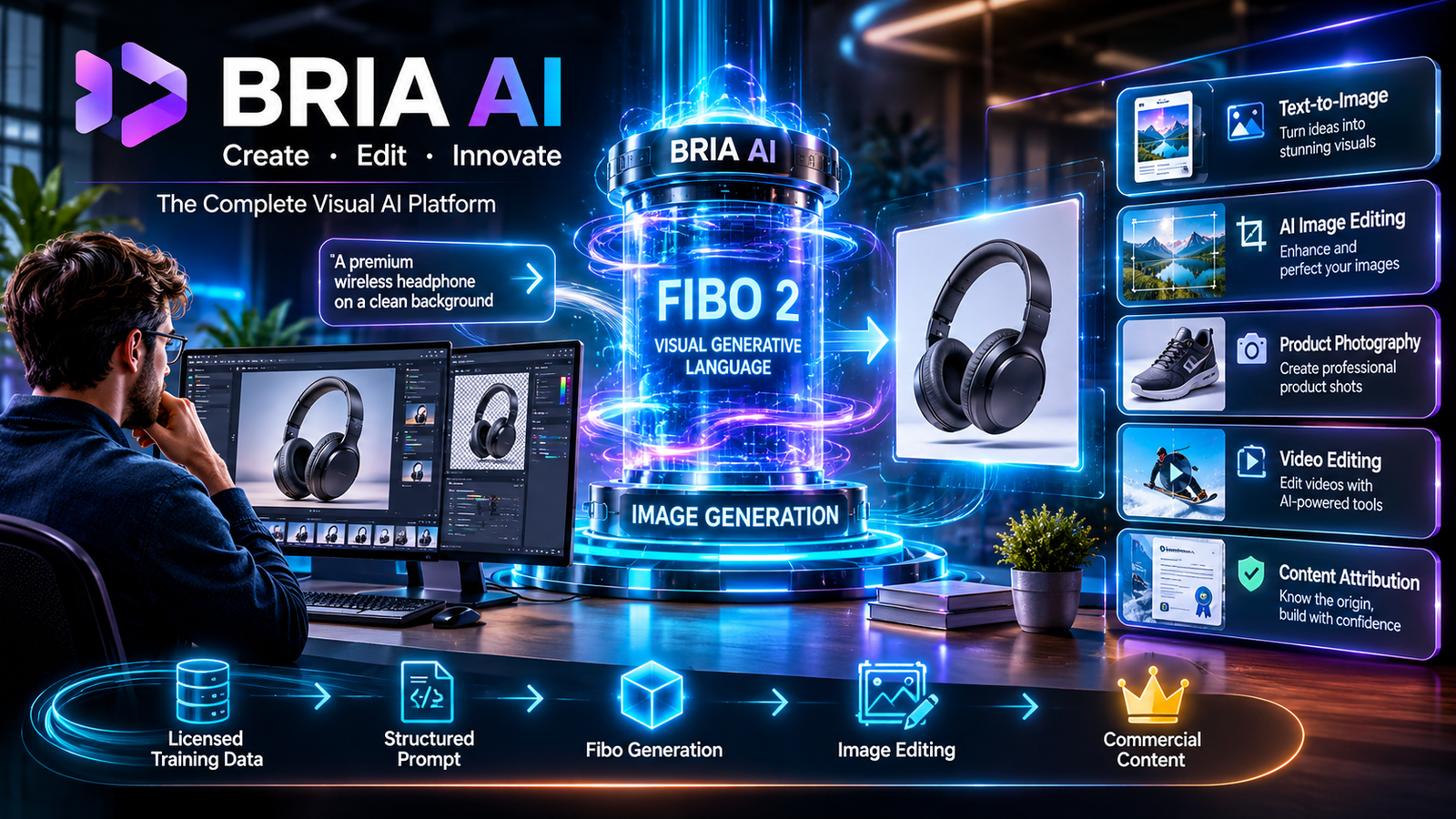
Bria AI is a visual generative AI platform that helps businesses and developers create, edit, and manage images and videos. It combines its Fibo model family, licensed training data, visual attribution technology, and developer APIs to support commercial creative workflows.
Bria AI at a Glance
- Platform: Commercial visual generative AI.
- Main technology: Fibo 2 and Fibo Lite.
- Primary capabilities: Image generation, image editing, product photography, and video editing.
- Developer tools: REST APIs, Python SDK, MCP server, and agent skills.
- Training approach: Bria states that its foundation models use licensed training data.
- Pricing: Free tier, pay-as-you-go usage, and custom enterprise options.
What Is Bria AI?
Bria AI is a commercial visual AI platform designed to simplify professional image creation and editing. It provides tools for generating images, modifying existing photographs, creating product visuals, and integrating visual AI into applications.
The platform serves two main audiences.
Creative users can use its visual tools to produce and modify marketing assets, product photographs, and other commercial imagery.
Developers and businesses can integrate its capabilities into websites, applications, and automated content production systems through Bria Build.
Bria Build is the company’s developer platform. It includes REST APIs, a Python SDK, an MCP server, and agent skills.
One of Bria’s main differentiators is its approach to training data. The company says its proprietary foundation models are trained exclusively on licensed content. Its attribution technology also helps connect generated outputs with the licensed material that influenced them.
This approach makes Bria particularly interesting for businesses concerned about intellectual property, content provenance, and commercial AI adoption.
How Does Bria AI Work?
Bria uses its Fibo model family to generate and edit visual content. Its image-generation architecture follows a structured process that separates prompt interpretation from image creation.
1. Enter a Prompt or Reference Image
Users begin with a text description or an existing image.
For example, a product designer might enter:
“Create a premium studio photograph of a black wireless headphone on a minimalist white background with realistic shadows.”
The system uses this information to understand the requested subject, composition, and visual style.
2. Convert Instructions Into Structured Data
Bria uses Visual Generative Language (VGL) to convert visual instructions into a structured JSON description.
This description acts as a blueprint for image generation.
Developers can inspect, save, and modify the structured instructions instead of relying entirely on repeated natural-language prompts.
3. Generate the Image
The Fibo 2 model uses the structured description to render the final image.
Bria documents two main generation pipelines:
- Standard Pipeline: Uses a Gemini 2.5 Flash visual-language bridge with Fibo 2. It prioritizes instruction adherence and visual fidelity.
- Fibo Lite Pipeline: Uses an open-source FIBO-VLM bridge and Fibo Lite. It targets faster inference and supports local, on-premises deployment.
The appropriate pipeline depends on the application’s performance, infrastructure, and privacy requirements.
4. Edit and Refine Visual Content
Users can modify generated images or existing assets through natural-language instructions and specialized editing endpoints.
For example, a developer can replace a background, remove an unwanted object, expand an image, or adjust lighting.
5. Track Attribution and Provenance
Bria also provides attribution and provenance features.
Its attribution system connects generated outputs with licensed training content. C2PA manifests and invisible watermarking support verification of Bria-generated assets.
These capabilities can help businesses maintain better visibility into their visual content workflows.
Key Features of Bria AI
Bria offers more than basic text-to-image generation. Its features cover several stages of professional visual production.
1. AI Image Generation
Bria’s Fibo 2 model generates images from text prompts, reference images, and structured visual instructions.
Users can create:
- Commercial product photographs
- Marketing visuals
- Lifestyle imagery
- Photorealistic illustrations
- Advertising concepts
- Custom visual assets
Fibo 2 also supports multiple aspect ratios and output resolutions.
Its structured generation process makes it easier to inspect and reuse visual instructions across production workflows.
2. AI Image Editing
Bria provides specialized tools for modifying existing images.
Important editing capabilities include:
| Feature | Purpose |
|---|---|
| Background removal | Isolate objects and products |
| Background replacement | Place subjects in new environments |
| Object removal | Remove unwanted image elements |
| Generative fill | Reconstruct selected image areas |
| Image expansion | Extend images beyond their original boundaries |
| Relighting | Adjust lighting conditions |
| Image restoration | Improve damaged or old photographs |
| Image enhancement | Refine image quality and resolution |
These tools are useful for businesses that need consistent editing operations across large image collections.
3. Product Photography and E-Commerce Tools
Product photography is one of Bria’s important commercial applications.
The platform includes specialized product-shot workflows for:
- Product cutouts
- Product packshots
- Consistent product shadows
- Lifestyle image generation
- Product integration into new scenes
- Product-holding images
- Virtual try-on
For example, an online retailer can start with an existing product photograph and create multiple lifestyle scenes.
This can reduce repetitive photography work and support faster marketing production.
However, generated images should always be reviewed for product accuracy. Labels, dimensions, colors, and other important details must match the actual product.
4. Fibo 2 and Fibo Lite Models
Fibo is the central model family behind Bria’s visual generation technology.
Fibo 2 supports image generation and editing through structured visual instructions.
Fibo Lite offers a lighter generation pipeline designed for faster processing and local deployment.
Bria also documents Fibo 2 Turbo, a self-hosted editing model designed for a four-step editing process. Its documentation specifies a GPU with at least 32 GB of memory.
Model availability, deployment requirements, and commercial permissions differ. Businesses should check the license for the exact model they intend to use.
5. Developer APIs and Integrations
Bria Build gives developers access to visual AI functionality through several interfaces.
Its developer ecosystem includes:
- REST APIs
- Python SDK
- MCP server
- Agent skills
- API documentation
- Integration examples
Developers can connect these capabilities to existing applications without building an image-generation model from scratch.
The API documentation includes endpoint descriptions, request schemas, and code examples.
6. AI Video Editing
Bria also supports video editing through its developer platform.
Documented capabilities include:
- Video background removal
- Background replacement
- Green-screen processing
- Video erasing
- Foreground masking
- Prompt-based masking
- Video resolution enhancement
The platform supports processing video files through REST APIs and live-stream processing through WebSockets.
However, these features should be understood as video editing capabilities, not as proof that Bria offers a complete text-to-video generation system.
7. Attribution and Content Provenance
Bria’s attribution technology is an important part of its commercial positioning.
The company says its system identifies licensed training content that influenced generated outputs. Its attribution process supports a revenue-sharing arrangement with content providers.
For self-hosted deployments, the Attribution Agent processes generated assets locally and sends irreversible embeddings to Bria.
C2PA manifests and invisible watermarking provide additional provenance information that can be checked through Bria’s verification tools.
These features are especially relevant to businesses managing commercial visual content.
Main Use Cases of Bria AI
Bria’s capabilities can support several practical business applications.
E-Commerce and Online Retail
Online retailers need consistent product images across websites, advertisements, and marketplaces.
Bria can help create product cutouts, packshots, lifestyle scenes, and alternative backgrounds.
This can make visual production more efficient while reducing the need for repeated manual editing.
Marketing and Advertising
Marketing teams can use Bria to generate campaign images, promotional assets, and creative variations.
Its editing capabilities also help teams adapt existing images for different advertising formats.
Creative Agencies
Agencies often produce visual content for multiple clients.
Bria’s APIs and structured generation workflows can help standardize repetitive creative tasks and integrate image processing into existing production systems.
Software Development
Developers can incorporate visual AI into applications, content management systems, and automated creative workflows.
The REST API and Python SDK provide practical integration options.
Enterprise Content Production
Large businesses may need consistent visual workflows across multiple departments.
Bria’s attribution technology, deployment options, and commercial licensing arrangements can help address some of these requirements.
Bria AI Pricing: How Much Does It Cost?
Bria offers free access, pay-as-you-go API usage, and customized enterprise arrangements.
Its official pricing page lists the following options:
| Plan | Price | Main Benefits |
|---|---|---|
| Free | $0 | 100 free generations |
| Pay-as-you-go | Starts at $0.018 per generation | Usage-based billing |
| Enterprise | Custom pricing | Enterprise licensing and deployment options |
The starting price is not the same as the price of every individual API endpoint.
Free Plan
The free plan includes 100 free generations without requiring a credit card.
Its listed benefits include:
- API, MCP, SDK, and agent skills access
- Integration options
- Data attribution on generated images
- Cloud-only deployment
- 10 requests per minute
- Queue-based processing
It is useful for exploring the platform and testing initial workflows.
Pay-as-You-Go Pricing
The pay-as-you-go plan removes the generation cap and charges according to usage.
It includes priority queue processing, a higher request limit, standard technical support, and capped standard indemnification.
Some listed API prices include:
| API Service | Price |
|---|---|
| Fibo image generation | $0.032/image |
| Fibo Lite generation | $0.0288/image |
| Structured prompt generation | $0.02/call |
| Fibo image editing | $0.032/image |
| Background removal | $0.018/image |
| Guided background removal | $0.025/image |
| Image expansion | $0.032/image |
| Image enhancement | $0.032/image |
Video editing and specialized product photography endpoints have separate usage rates.
The actual cost depends on the services, endpoints, and volume used.
Enterprise Pricing
Enterprise pricing is customized according to business requirements.
The published enterprise benefits include:
- Commercial use rights for applicable open-source models
- Unlimited IP indemnification under the applicable agreement
- Visual birth certificates and copyrightability reports
- SSO and SAML
- Audit logs
- Custom data processing agreements
- On-premises and bring-your-own-cloud deployment
- Custom rate limits
- Dedicated performance capacity
Businesses should review the actual agreement before relying on any specific protection or service commitment.
Pricing recommendation: Start with the free plan to test image quality and workflow compatibility. Calculate endpoint-level costs before moving into production.
Privacy, Security, and Commercial Licensing
Commercial licensing is an important consideration when adopting generative AI.
Bria addresses this area through licensed training data, attribution technology, and enterprise deployment options.
Licensed Training Data
Bria states that its proprietary foundation models are trained exclusively on licensed content.
The company also describes agreements with content providers and an attribution mechanism designed to distribute revenue according to the contribution of licensed material.
This is an important distinction when comparing AI platforms.
However, licensed training data does not automatically make every possible use of generated content legally risk-free. Businesses should still review their intended applications and contractual terms.
Commercial Usage Rights
Bria provides commercial usage arrangements through its different plans.
The free, pay-as-you-go, and enterprise options do not offer identical contractual protections.
Before using generated assets commercially, businesses should examine:
- Commercial usage permissions
- Model-specific licensing
- Indemnification coverage
- Contractual exclusions
- Redistribution rights
- Ownership and usage restrictions
Cloud and Self-Hosted Deployment
Bria provides different deployment options.
| Deployment | Description |
|---|---|
| Bria Cloud | Uses Bria’s hosted infrastructure |
| Self-hosted | Runs licensed models on customer GPUs |
| BYOC | Uses the customer’s cloud infrastructure |
| On-premises | Runs within the organization’s own data center |
Self-hosting can provide greater control over where image and video processing happens.
However, it requires appropriate infrastructure and an active license for each selected model.
An important privacy distinction also applies: the self-hosted Attribution Agent sends irreversible embeddings to Bria, rather than the original generated images or videos.
Businesses with strict data-governance requirements should review the complete data flow before deployment.
Bria AI Limitations: What Should You Consider?
Bria has useful capabilities, but it is not the ideal solution for every user.
1. Developer Knowledge May Be Necessary
Some of its most powerful features are delivered through APIs.
Developers may need experience with authentication, API requests, response handling, and application integration.
2. Usage Costs Can Increase
Individual API operations have separate charges.
A production workflow that combines generation, background removal, enhancement, and editing can cost more than the initial generation price.
Businesses should estimate total operations rather than calculating costs from one endpoint.
3. Asynchronous API Processing
Bria API v2 endpoints process requests asynchronously by default.
The API returns a request ID and status URL. Developers then use polling or webhooks to retrieve the completed result.
Applications must implement this process correctly.
4. Model Licensing Requires Attention
Access to published model weights does not automatically provide unrestricted commercial rights.
Bria’s documentation distinguishes source-available non-commercial model access from licensed commercial deployment.
Check the individual model license before downloading or integrating weights into a commercial product.
5. Infrastructure Requirements
Self-hosting requires suitable GPU hardware, installation work, and technical maintenance.
For example, Bria documents a minimum of 32 GB GPU memory for Fibo 2 Turbo and RMBG 3.0.
Cloud access may be simpler for teams that do not want to maintain their own infrastructure.
6. Generated Content Still Needs Human Review
AI-generated images can contain visual inconsistencies, incorrect product details, or unwanted changes.
Businesses should review important commercial assets before publishing them.
Best Bria AI Alternatives and Competitors
Bria competes with several visual AI platforms. However, each alternative serves somewhat different creative and technical requirements.
1. Adobe Firefly
Best for: Designers and professional creative teams.
Adobe Firefly provides generative image and editing capabilities within Adobe’s creative ecosystem.
It is worth considering for professionals who already use Photoshop and Illustrator.
Main limitation: Its workflow and enterprise infrastructure differ from Bria’s specialized attribution and deployment approach.
Website: https://www.adobe.com/products/firefly.html
2. Black Forest Labs FLUX
Best for: Developers, AI enthusiasts, and creative teams.
FLUX is a family of generative image models that supports different creative and technical workflows.
It is worth evaluating when model flexibility and customization are priorities.
Main limitation: Licensing and commercial permissions vary by model.
Website: https://blackforestlabs.ai/
3. Midjourney
Best for: Artists, designers, and visual creators.
Midjourney is known for its image-generation experience and artistic visual output.
It may suit users who prioritize creative image production over API-based enterprise integration.
Main limitation: It is not a direct replacement for Bria’s specialized commercial attribution and self-hosting capabilities.
Website: https://www.midjourney.com/
4. Stability AI
Best for: Developers and researchers exploring customizable generative models.
Stability AI provides generative AI models and related tools for building different creative applications.
Main limitation: Model licensing, infrastructure, and commercial permissions require individual evaluation.
Website: https://stability.ai/
Bria AI vs. Competitors
| Platform | Main Strength | Suitable For | Pricing Model |
|---|---|---|---|
| Bria AI | Licensed-data visual AI and attribution | Businesses and developers | Free, usage-based, enterprise |
| Adobe Firefly | Creative software integration | Designers and agencies | Subscription and plan-dependent |
| FLUX | Flexible image model ecosystem | Developers and creators | Model/provider-dependent |
| Midjourney | Artistic image generation | Artists and designers | Subscription |
| Stability AI | Customizable generative models | Developers and researchers | Model/provider-dependent |
The right alternative depends on your requirements.
Bria is worth evaluating when commercial licensing, attribution, structured image generation, and enterprise deployment matter. Adobe Firefly may be more convenient for Adobe users, while Midjourney may better suit artistic image creation.
Who Should Use Bria AI?
Bria is particularly relevant to users who need professional visual production rather than occasional AI-generated images.
Businesses: Companies producing commercial visual content can investigate its licensing and attribution approach.
Developers: Software teams can integrate image generation and editing into their applications.
E-commerce companies: Online retailers can explore product photography and automated image-processing workflows.
Marketing agencies: Creative teams can use its editing tools and structured generation capabilities for campaign production.
Enterprise organizations: Companies with specific deployment and data-governance requirements can evaluate its self-hosting and enterprise options.
However, casual users who only need occasional artwork may prefer a simpler consumer-oriented image generator.
Latest Bria AI Developments in 2026
Bria’s current developer documentation highlights several important developments in its visual AI ecosystem.
Fibo 2 Image Generation
Bria’s current image-generation documentation identifies Fibo 2 as its main image-generation architecture.
It supports text prompts, reference images, and structured visual prompts. The documentation also describes additional aspect ratios and improved control over generation.
Bria Build Developer Ecosystem
Bria Build brings together REST APIs, Python SDK access, an MCP server, and agent skills.
This makes the platform relevant to developers building automated creative applications and agent-based workflows.
Expanded Self-Hosting Options
Bria documents licensed self-hosting for selected models, including Fibo 2, Fibo 2 Turbo, RMBG 2.0, and RMBG 3.0.
These options allow customers to run supported models on their own GPU infrastructure.
Attribution and Provenance
Bria continues to emphasize licensed training data, attribution, and content verification.
Its documentation describes C2PA manifests, invisible watermarking, and attribution services for generated assets.
These developments demonstrate the platform’s focus on commercial visual AI infrastructure.
Frequently Asked Questions
1. What is Bria AI used for?
Bria AI is used to generate and edit images, create product photography, process visual assets, and integrate generative AI into business applications. It also provides developer APIs and deployment options for businesses.
2. Is Bria AI free to use?
Yes. Bria offers a free plan with 100 generations and no credit card requirement. Paid API usage starts at $0.018 per generation, although individual services have different prices.
3. Can Bria AI images be used commercially?
Bria offers commercial usage arrangements and states that its proprietary foundation models use licensed training data. However, commercial rights and indemnification depend on the applicable plan, model, and agreement.
4. Does Bria AI offer an API?
Yes. Bria provides REST APIs, a Python SDK, an MCP server, and agent skills. Developers can integrate image generation, image editing, product photography, and other visual workflows into their applications.
5. What are the best alternatives to Bria AI?
Relevant alternatives include Adobe Firefly, FLUX, Midjourney, and Stability AI. The right choice depends on whether you prioritize artistic image generation, developer flexibility, commercial licensing, or enterprise deployment.
Conclusion
Bria AI is a commercial visual generative AI platform that combines image generation, editing, product photography, video editing, and developer infrastructure.
Its Fibo models, licensed-data approach, structured visual generation, and attribution technology make it particularly relevant to businesses and developers.
However, users should evaluate API costs, model licensing, infrastructure requirements, and commercial agreements before adopting it.
The best starting point is to test the free plan, compare generation quality against actual business requirements, and estimate the full cost of production workflows.
For companies building commercial visual AI applications, Bria is a platform worth exploring.