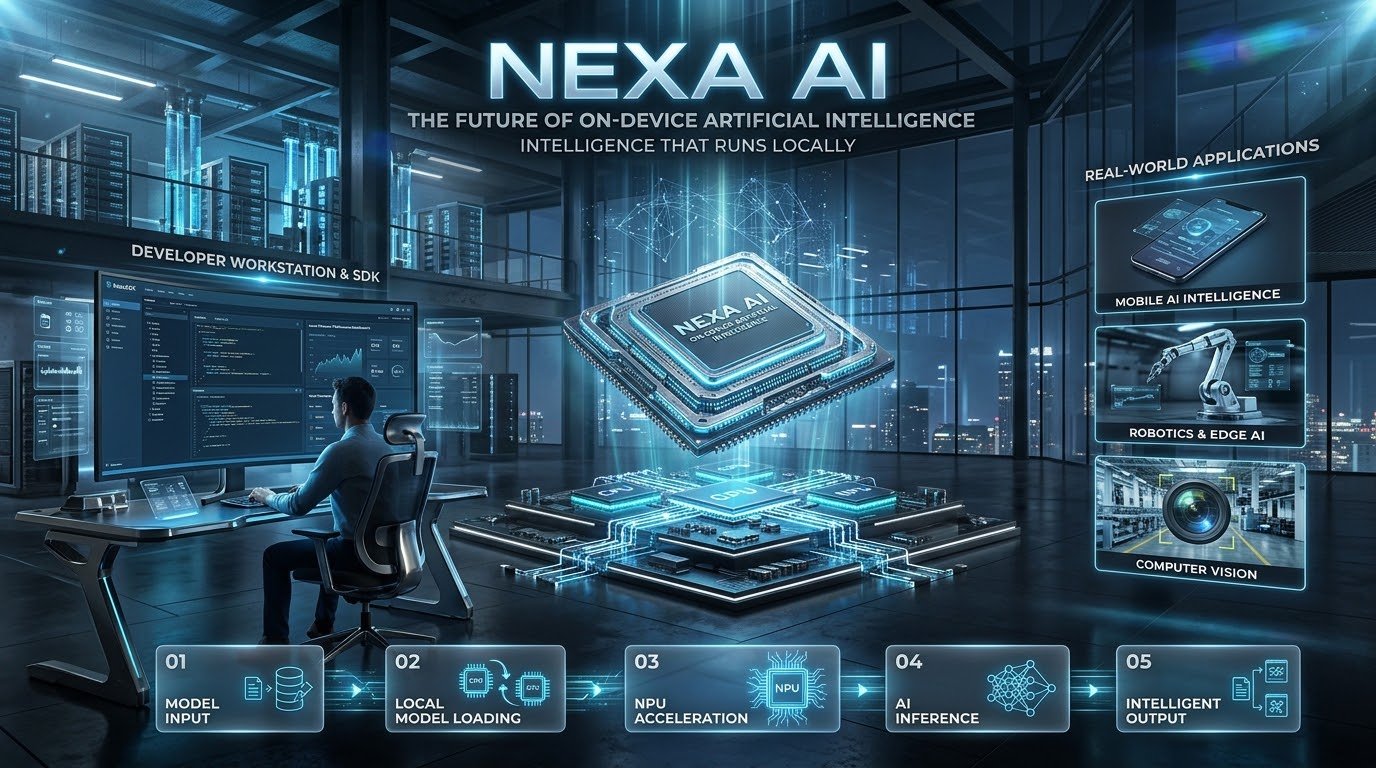
Nexa AI is an AI technology company focused on running artificial intelligence models directly on local devices instead of relying entirely on cloud servers. Following its acquisition by Qualcomm in 2026, its technology and developer work have become part of Qualcomm AI Hub, with GenieX emerging as the successor to NexaSDK.
Nexa AI at a Glance
| Category | Details |
|---|---|
| Industry | Artificial intelligence |
| Main focus | On-device AI inference |
| Original developer product | NexaSDK |
| Successor technology | GenieX |
| Parent ecosystem | Qualcomm AI Hub |
| Target audience | Developers and businesses |
| Key hardware | CPU, GPU, and NPU |
| Supported environments | Windows, Android, Linux |
| Main advantage | Local AI model execution |
| Pricing | Check current product documentation |
Important: Nexa AI is not simply another chatbot or AI writing assistant. Its primary technology addresses a different problem: helping developers run AI models efficiently on actual devices.
What Is Nexa AI?
Nexa AI is an artificial intelligence technology company that developed software for deploying and running AI models locally. Rather than sending every request to a remote cloud service, its technology helps applications execute AI workloads using the processing hardware available on the device.
This approach is known as on-device AI inference.
Traditional AI applications often depend on remote infrastructure. A user submits a request, a cloud server processes it, and the result travels back through the internet.
Nexa AI takes a different approach. Its technology connects AI models with local processing hardware, including CPUs, GPUs, and Neural Processing Units (NPUs).
This makes it particularly relevant to developers building:
- AI-powered mobile applications.
- Intelligent desktop software.
- Offline-capable AI assistants.
- Smart cameras and security systems.
- Industrial automation solutions.
- Robotics and IoT products.
- Voice recognition and image understanding tools.
What happened to Nexa AI?
One of the most important developments is Nexa AI’s acquisition by Qualcomm in 2026.
Qualcomm announced that the Nexa AI team had joined its organization. The company’s July 2026 developer announcement introduced GenieX, an open-source generative AI runtime developed by the former Nexa team.
Qualcomm describes GenieX as a way to run generative AI models across NPU, GPU, and CPU hardware. It also confirms that existing NexaSDK users can continue using the previous technology. Qualcomm+1
This changes how people should understand the Nexa AI brand today.
Instead of evaluating it only as an independent startup, developers should consider its technology within the broader Qualcomm AI Hub ecosystem.
How Does Nexa AI Work?
Nexa AI’s underlying approach combines AI models, inference software, and device hardware.
The process begins when a developer selects a compatible AI model. The software then loads that model and connects it to an appropriate processing engine.
Here is how the workflow operates.
1. Select an AI Model
Developers first choose the model that matches their application.
Different models handle different tasks:
- Large language models generate and understand text.
- Vision-language models interpret images and text together.
- Automatic speech recognition models convert speech into text.
- Embedding models convert information into numerical representations.
- Computer vision models identify objects and visual patterns.
- Reranking models improve the relevance of search results.
Model size, architecture, quantization, and hardware compatibility all influence deployment.
2. Load the Model Locally
The selected model is downloaded or supplied to the application.
The runtime loads its files into the device’s available memory. This process requires sufficient RAM and compatible software dependencies.
Large models generally require more memory and processing resources than smaller models.
3. Select the Processing Hardware
The inference runtime determines which available processing unit can execute the model.
| Hardware | Primary responsibility |
|---|---|
| CPU | General-purpose processing |
| GPU | Parallel computation |
| NPU | Specialized AI acceleration |
An NPU is particularly useful for AI workloads that need efficient processing with limited power consumption.
However, acceleration depends on the model format, device architecture, runtime support, and available memory.
4. Generate the Output
After initialization, the model processes user input and produces a result.
For example, a locally running assistant might summarize a document without sending its entire contents to an external AI server.
A computer vision application might analyze a camera feed directly on an edge device.
5. Integrate AI Into an Application
Developers can connect the inference runtime to their own software.
Depending on the implementation, this can involve native application libraries, command-line tools, Python packages, or local APIs.
The result is an application that can perform selected AI tasks without requiring a cloud API for every inference request.
NexaSDK: The Technology Behind Nexa AI
NexaSDK was one of Nexa AI’s central developer products.
It provided a toolkit for running AI models across different hardware environments. Its purpose was to reduce the engineering work required to connect AI models with local processing resources.
The original NexaSDK documentation describes support for multiple model categories, including language, vision, speech, embeddings, and reranking. It also documents GGUF, MLX, and Nexa’s proprietary .nexa model formats. Documentations+1
Key NexaSDK capabilities
Local model execution: Developers can run compatible AI models on supported hardware rather than depending exclusively on remote inference services.
Hardware acceleration: The SDK connects supported models with CPU, GPU, and NPU processing capabilities.
Multimodal AI: Its documented model ecosystem covers text, image, audio, and other AI workloads.
Developer integration: CLI tools and programming interfaces simplify experimentation and application development.
Model compatibility: Different model formats make it possible to work with a range of model architectures and deployment requirements.
NexaSDK versus GenieX
Understanding the transition from NexaSDK to GenieX is essential when researching Nexa AI in 2026.
| Area | NexaSDK | GenieX |
|---|---|---|
| Origin | Nexa AI | Former Nexa team at Qualcomm |
| Main purpose | Local AI inference | Generative AI deployment |
| Hardware | Multiple supported processors | Qualcomm NPU, GPU, CPU |
| Platforms | Documented desktop, mobile and Linux support | Windows, Android and Linux |
| Development status | Existing product documentation | Developer preview announced July 2026 |
| Licensing | Depends on individual components and access | BSD-3-Clause open-source runtime |
GenieX combines llama.cpp with Qualcomm AI Runtime (QAIRT), aiming to provide broad model compatibility alongside optimized execution on Qualcomm hardware.
Qualcomm’s announcement also documents GGUF model support, Qualcomm AI Hub model integration, Python interfaces, and OpenAI-compatible local server APIs. Qualcomm
This is an important distinction: GenieX is not simply a new name for every historical NexaSDK feature. Developers should check the specific documentation for their target platform and workflow.
Key Features of Nexa AI
Nexa AI’s most interesting capabilities relate to local execution, hardware optimization, and model deployment.
These capabilities address practical challenges that developers face when building AI-powered applications.
1. On-Device AI Inference
On-device inference allows an AI model to process information directly on a smartphone, computer, or edge device.
This reduces the need to transmit every request to a cloud server.
Potential advantages include:
- Reduced dependence on internet connectivity.
- Lower network communication overhead.
- Better control over where information is processed.
- Faster responses when local execution is efficient.
- More predictable infrastructure requirements.
However, local processing does not automatically guarantee better performance. Hardware limitations and model size still matter.
2. NPU Acceleration
Neural Processing Units are specialized processors designed for AI workloads.
Nexa AI’s technology was developed to take advantage of available AI hardware rather than relying exclusively on conventional CPU processing.
Qualcomm’s ecosystem makes this especially relevant for Snapdragon-powered devices.
An NPU can improve performance-per-watt for supported workloads. This matters for battery-powered devices, industrial equipment, and always-on AI applications.
The actual improvement depends on the model and hardware configuration.
3. Multimodal AI Support
Modern AI applications increasingly work with more than text.
They may need to understand photographs, audio recordings, documents, and video.
NexaSDK’s documented capabilities include several model categories:
- LLMs: Generate text and answer questions.
- VLMs: Understand images alongside language.
- ASR: Convert speech into text.
- Embeddings: Represent information for semantic search.
- Rerankers: Reorder search results by relevance.
- Computer vision: Identify objects and visual information.
This flexibility makes the technology relevant to developers creating more advanced AI applications. Qualcomm+1
4. Cross-Platform Development
Developers rarely build products for only one hardware environment.
A commercial application might need to operate on Windows computers, Android smartphones, and Linux-based industrial equipment.
NexaSDK documented support across several operating systems, while GenieX’s July 2026 developer preview specifically covered Windows, Android, and Linux.
The implementation differs by platform:
| Platform | Documented development approach |
|---|---|
| Windows | CLI, Python package and local server |
| Android | Native Maven package |
| Linux | Docker, CLI, Python and local server |
This gives developers multiple integration paths instead of requiring one deployment method for every product. Qualcomm+1
5. OpenAI-Compatible Local APIs
One particularly useful GenieX feature is its OpenAI-compatible local server API.
Developers familiar with OpenAI-style API requests may find it easier to connect applications to a locally running model.
The distinction is important.
An OpenAI-compatible API does not mean the application is using OpenAI models. It describes an interface that follows a familiar API structure.
This can simplify integrations with existing development tools and applications.
6. Open-Source Development
GenieX is released under the BSD-3-Clause license, according to Qualcomm’s developer announcement.
This permissive license allows developers to inspect, modify, and distribute the project under its licensing conditions.
Open-source availability also makes community contributions possible.
However, developers should distinguish the runtime’s license from the licenses governing individual AI models. A permissively licensed runtime does not automatically make every downloadable model free for commercial use. Qualcomm
Main Use Cases of Nexa AI
Nexa AI’s technology is particularly relevant when an application needs AI capabilities close to the user, device, or physical environment.
Here are the most practical application areas.
1. AI-Powered Mobile Applications
Mobile developers can use local AI inference to introduce intelligent features into smartphone applications.
Potential applications include:
- Offline writing assistance.
- Voice transcription.
- Image recognition.
- Document summarization.
- Personal AI assistants.
- On-device search.
For example, a note-taking application could summarize recorded meetings locally when its model and device support the required workload.
2. Robotics and Industrial Automation
Robots often need to interpret their surroundings and respond to changing conditions.
Cloud-dependent processing can introduce communication delays or reliability problems when connectivity becomes unstable.
Local AI inference offers another option.
A robot equipped with suitable hardware could use computer vision to identify objects, interpret camera input, or support navigation-related decisions.
Qualcomm’s March 2026 technical article specifically discussed NexaSDK for Linux and its application to robotics and IoT devices. It covered Qualcomm Dragonwing IQ9 and RB3 Gen 2 platforms. Qualcomm
3. Smart Cameras and Video Analysis
Smart surveillance systems can use AI models to interpret visual information.
Possible applications include:
- Object detection.
- Restricted-area monitoring.
- Visual anomaly detection.
- Activity recognition.
- Automated video summaries.
Local processing can reduce the amount of video that needs to travel to cloud infrastructure.
However, organizations must still address camera permissions, data storage, access control, and applicable privacy regulations.
4. Voice Assistants and Speech Recognition
Voice-enabled products require several AI components.
A typical workflow may involve speech recognition, language understanding, and speech generation.
Local inference can help applications process voice commands without sending every recording to a remote service.
This is useful for automotive interfaces, industrial voice controls, and mobile assistants.
The availability of each capability depends on compatible models and hardware.
5. Enterprise AI and Private Workflows
Businesses increasingly want to use AI without transferring every document or internal request to external infrastructure.
Local inference can help with selected workflows, including:
- Internal document search.
- Offline knowledge assistants.
- Local transcription.
- Sensitive information classification.
- On-device customer support.
For enterprise adoption, the complete deployment still needs proper access controls, logging, encryption, and data governance.
Benefits of Nexa AI
The strongest argument for Nexa AI is its focus on practical AI deployment rather than simply providing another conversational interface.
Its approach offers several potential benefits.
Reduced Cloud Dependency
Cloud AI requires communication between a user’s device and remote servers.
Local inference can eliminate that dependency for compatible workloads.
This is particularly valuable when internet connectivity is limited or expensive.
Better Control Over Data Processing
When a model processes information locally, the application can avoid sending that particular input to a cloud inference provider.
This can support privacy-conscious product design.
However, local inference alone does not guarantee complete privacy. Applications may still transmit analytics, crash reports, telemetry, or other information.
Lower Network Costs
Applications processing large volumes of images, audio, or sensor data may generate significant network traffic.
Running selected workloads locally can reduce data transmission.
It may also reduce recurring cloud inference expenses.
However, the hardware, maintenance, and optimization costs must be included in any realistic calculation.
Faster Responses in Suitable Workloads
Local processing removes the network round trip to a remote inference server.
This can improve responsiveness for applications where the local hardware executes the model efficiently.
But an underpowered device may run a model more slowly than a high-performance cloud server.
Greater Deployment Flexibility
Developers can choose models and hardware configurations according to their application’s requirements.
This is particularly useful for organizations developing specialized AI products rather than relying on a single cloud-based service.
Nexa AI Pricing: Is It Free?
Pricing requires particular attention because Nexa AI’s transition into Qualcomm’s ecosystem makes older pricing information potentially misleading.
There is an important difference between three things:
- An open-source runtime.
- Access to optimized or proprietary model files.
- Commercial hardware and deployment infrastructure.
GenieX’s BSD-3-Clause license allows developers to use the runtime under its licensing conditions. It does not mean every model, hardware platform, or related service is free.
Similarly, historical NexaSDK documentation describes access-token requirements for certain NPU models. Developers should not assume that model access and runtime licensing have identical conditions. Qualcomm+1
| Pricing component | What to understand |
|---|---|
| GenieX runtime | Open-source under BSD-3-Clause |
| AI models | Individual model licenses apply |
| NPU model access | Check model-specific access requirements |
| Hardware | Depends on the selected device |
| Enterprise deployment | Confirm current commercial terms |
| Cloud services | Separate infrastructure costs may apply |
Editorial recommendation
Before choosing a deployment, calculate the total cost of ownership. Include hardware purchases, engineering time, model optimization, updates, and ongoing maintenance.
Nexa AI Privacy and Security
Privacy is one of the major reasons developers explore on-device AI.
When models operate locally, applications can process selected information without transmitting it to external inference servers.
This creates an opportunity to build privacy-conscious applications.
However, there are important distinctions between local execution and complete data protection.
Does Nexa AI keep user data private?
Local inference can reduce the need to share prompts and files with external AI providers.
Nevertheless, developers must examine the entire application architecture.
Consider these questions:
- Does the application send telemetry to external servers?
- Are user prompts stored locally?
- Are downloaded models verified?
- Does the application require account authentication?
- Are API requests sent to third-party services?
- Can administrators control model access?
- How are application updates delivered?
A product can run its AI model locally while still transmitting other information over the internet.
Is Nexa AI suitable for enterprise use?
It can be relevant to enterprise projects that require local processing, but suitability depends on implementation.
Organizations should evaluate:
- Device-level encryption.
- Authentication and authorization.
- Software supply-chain security.
- Model provenance.
- Data retention policies.
- Audit logging.
- Compliance requirements.
- Update and vulnerability management.
Do not assume that local AI automatically provides SOC 2 certification or Zero Data Retention.
These are separate security and compliance considerations.
Limitations and Challenges of Nexa AI
Despite its advantages, local AI deployment introduces challenges that developers should understand before committing to the technology.
1. Hardware Requirements
Running AI models locally requires sufficient memory and processing power.
A small language model may work on a smartphone, while a larger multimodal model could require a more powerful computer.
NPU acceleration also depends on hardware compatibility.
A model optimized for one processor may not achieve the same performance on another.
2. Model Compatibility
Not every AI model works on every device.
Developers must consider:
- Supported model architectures.
- Model file formats.
- Quantization requirements.
- Runtime compatibility.
- Available memory.
- Processor-specific optimization.
For example, a model available in GGUF format may require a different execution path from an NPU-optimized model.
3. Limited Resources on Edge Devices
Local devices have finite memory, battery capacity, and thermal limits.
Running a demanding model continuously can increase power consumption and generate heat.
This becomes particularly important for smartphones, embedded systems, and battery-powered IoT products.
4. Model Updates and Maintenance
Cloud AI providers can update their infrastructure without requiring users to download an entirely new model.
Local deployments are different.
Developers may need to manage model downloads, compatibility, security updates, and version control.
This adds operational responsibility.
5. Developer Experience and Migration
The transition from NexaSDK to GenieX may require developers to review their existing implementations.
Existing NexaSDK users can continue using their current technology, according to Qualcomm. However, that does not guarantee that every older integration will transfer directly to GenieX.
Teams should test dependencies, APIs, model compatibility, and deployment procedures before migrating. Qualcomm
Nexa AI vs. Competitors and Alternatives
Nexa AI belongs to the on-device AI infrastructure category.
Its alternatives are not necessarily other AI chatbots. They include inference runtimes, local model managers, and hardware-specific deployment platforms.
Qualcomm AI Hub
Current ecosystem
Qualcomm’s broader ecosystem for optimizing, validating, and deploying AI models on supported devices. It now incorporates the former Nexa AI team’s GenieX work.
Ollama
A popular tool for downloading and running local language models. It suits developers and individuals who want a relatively straightforward local LLM environment.
llama.cpp
A lightweight inference engine designed for running supported language models across different hardware configurations. It provides developers with substantial control over deployment.
LM Studio
A desktop application for discovering, downloading, and running local AI models. Its graphical interface makes it attractive to users who prefer not to manage everything through a terminal.
Hugging Face
A major platform for discovering models, datasets, and machine learning development resources. It complements local inference tools rather than serving as a direct replacement for every runtime.
Feature Comparison
| Platform | Primary focus | Target user | Pricing transparency | Main limitation |
|---|---|---|---|---|
| Nexa AI / GenieX | Local generative AI runtime | Developers | Open-source license; model terms vary | Qualcomm-focused optimization |
| Qualcomm AI Hub | Model optimization and deployment | AI engineering teams | Check individual services | Hardware ecosystem focus |
| Ollama | Local LLM execution | Developers and general users | Open-source core | Not a complete cross-modal deployment stack |
| llama.cpp | Efficient model inference | Technical developers | Open-source | Requires more technical configuration |
| LM Studio | Desktop local AI | Individuals and developers | Check current commercial terms | Desktop-oriented experience |
| Hugging Face | Model discovery and development | Researchers and developers | Varies by service | Not a standalone inference runtime |
These platforms solve related but different problems. The right choice depends on whether the priority is local experimentation, hardware acceleration, model discovery, or production deployment.
Nexa AI vs. Cloud-Based AI
Another useful comparison is between local inference and traditional cloud AI.
| Factor | Nexa AI approach | Cloud AI approach |
|---|---|---|
| Processing | Local device | Remote servers |
| Internet dependency | Not always required | Usually required |
| Data transmission | Can be reduced | Usually required |
| Hardware | User’s device | Provider’s infrastructure |
| Scaling | Device-dependent | Provider-dependent |
| Maintenance | Developer-managed | Shared with provider |
| Performance | Depends on local hardware | Depends on network and server capacity |
| Cost structure | Hardware and maintenance | Usage and subscription costs |
Neither approach is universally superior.
Local inference works well when predictable offline operation, local data processing, and device integration matter.
Cloud inference is often more practical for demanding models, centralized management, and applications requiring large amounts of computing power.
Some applications benefit from combining both approaches.
For example, a mobile assistant could handle basic requests locally and send more complex tasks to a cloud model when the user permits it.
Who Should Use Nexa AI?
Nexa AI’s technology is primarily relevant to people building AI-powered software.
Developers
Software developers can explore local model execution and integrate AI features into existing applications.
GenieX is particularly relevant to developers working with Qualcomm-powered hardware.
AI Researchers
Researchers experimenting with model optimization, quantization, and edge deployment may find the ecosystem useful.
It can help them evaluate how models behave outside large cloud environments.
Robotics Engineers
Robotics developers can investigate local vision and language models for intelligent machines.
Low-latency processing can be valuable when devices need to respond to their physical surroundings.
IoT Manufacturers
Manufacturers building connected devices can explore local AI for monitoring, recognition, and automation.
This can reduce dependence on constant cloud communication.
Enterprise Technology Teams
Businesses evaluating private AI deployments may consider local inference for selected workflows.
However, enterprise adoption requires additional security, compliance, maintenance, and lifecycle planning.
Who Should Look Elsewhere?
Nexa AI may not be the right starting point for someone who simply wants an everyday AI chatbot.
Users primarily interested in writing emails, generating marketing content, or answering general questions may find conventional AI assistant platforms easier to use.
Its value becomes clearer when the goal is to build or deploy AI software.
How to Get Started With Nexa AI Technology
For developers researching the original Nexa AI ecosystem, the most practical starting point is to understand the transition to Qualcomm AI Hub.
Here is a sensible learning path.
Step 1: Explore Qualcomm AI Hub
Visit the official Qualcomm AI Hub website.
Explore its model catalog, GenieX resources, and development tools.
Step 2: Review GenieX Documentation
Read the GenieX developer documentation.
Check installation requirements and platform-specific instructions.
Step 3: Choose a Compatible Model
Start with a relatively small model.
Check its architecture, file format, memory requirements, license, and hardware compatibility.
Do not begin with the largest available model simply because it appears more capable.
Step 4: Test Local Inference
Run a basic prompt or inference task.
Measure:
- Model loading time.
- Time to first token.
- Tokens generated per second.
- Memory consumption.
- Power consumption.
- Output quality.
These measurements provide a more realistic understanding than marketing claims.
Step 5: Integrate the Model
Once the model works correctly, connect it to a test application.
Evaluate API behavior, error handling, concurrent requests, and application stability.
Step 6: Prepare for Production
Before releasing the application, test it across the actual devices your users will own.
Establish procedures for model updates, monitoring, security, and hardware compatibility.
This is especially important for applications deployed across large device fleets.
Latest Nexa AI Developments in 2026
Several developments explain why Nexa AI remains relevant to on-device AI research.
- Nexa AI joins QualcommQualcomm acquired Nexa AI in 2026, bringing its team and technology into the Qualcomm ecosystem. Qualcomm
- NexaSDK expands into industrial AIQualcomm’s March 2026 announcement described NexaSDK for Linux, including Docker-based deployment for IoT and robotics applications. Qualcomm
- GenieX developer preview arrivesOn July 7, 2026, Qualcomm introduced GenieX, an open-source runtime developed by the former Nexa team. Qualcomm
- Qualcomm AI Hub expands its ecosystemThe current platform highlights GenieX, more than 300 optimized machine learning and generative AI models, and Workbench tools for model optimization. Qualcomm AI Hub
The overall direction is clear: AI deployment is expanding beyond cloud infrastructure and into smartphones, computers, industrial equipment, and connected devices.
Nexa AI’s technology is now part of that broader transition.
Frequently Asked Questions
1. What is Nexa AI used for?
Nexa AI developed technology for running AI models locally on devices. Its tools supported applications involving language models, computer vision, speech recognition, and other AI workloads. Its technology is now part of Qualcomm’s AI ecosystem.
2. Is Nexa AI part of Qualcomm?
Yes. Qualcomm acquired Nexa AI in 2026. The former Nexa team subsequently introduced GenieX, an open-source generative AI runtime within Qualcomm’s developer ecosystem.
3. What is the difference between NexaSDK and GenieX?
NexaSDK was Nexa AI’s original toolkit for local AI inference across supported hardware and platforms. GenieX is its successor generative AI runtime, combining llama.cpp and Qualcomm AI Runtime to simplify model execution on Qualcomm processors.
4. Can Nexa AI run AI models without the internet?
Yes, compatible local models can run without continuous internet connectivity once the required software and model files are available on the device. Initial downloads, licensing, updates, or other application services may still require connectivity.
5. Is Nexa AI free to use?
GenieX is open-source under the BSD-3-Clause license. However, individual model licenses, hardware requirements, access restrictions, and commercial deployment terms can differ. Developers should check the relevant documentation before using it commercially.
Conclusion
Nexa AI represents an important part of the shift toward local and edge-based artificial intelligence.
Its original NexaSDK technology helped developers run AI models using local hardware instead of depending entirely on cloud infrastructure. Following its acquisition by Qualcomm, the former Nexa team introduced GenieX as a new development direction.
The technology is particularly relevant to developers building mobile applications, robotics systems, industrial AI products, and privacy-conscious software.
However, hardware compatibility, model licensing, memory requirements, and ongoing maintenance remain important considerations.
If you are evaluating Nexa AI, start by exploring Qualcomm AI Hub and GenieX. Test a compatible model on your target hardware before committing to a larger deployment.

Alex Carter is a technology writer at AI SpaceZ.com, who covers AI tools, software reviews, practical tutorials and emerging artificial intelligence trends. He aims to make AI easier to understand and help readers discover useful tools and technologies for everyday productivity.