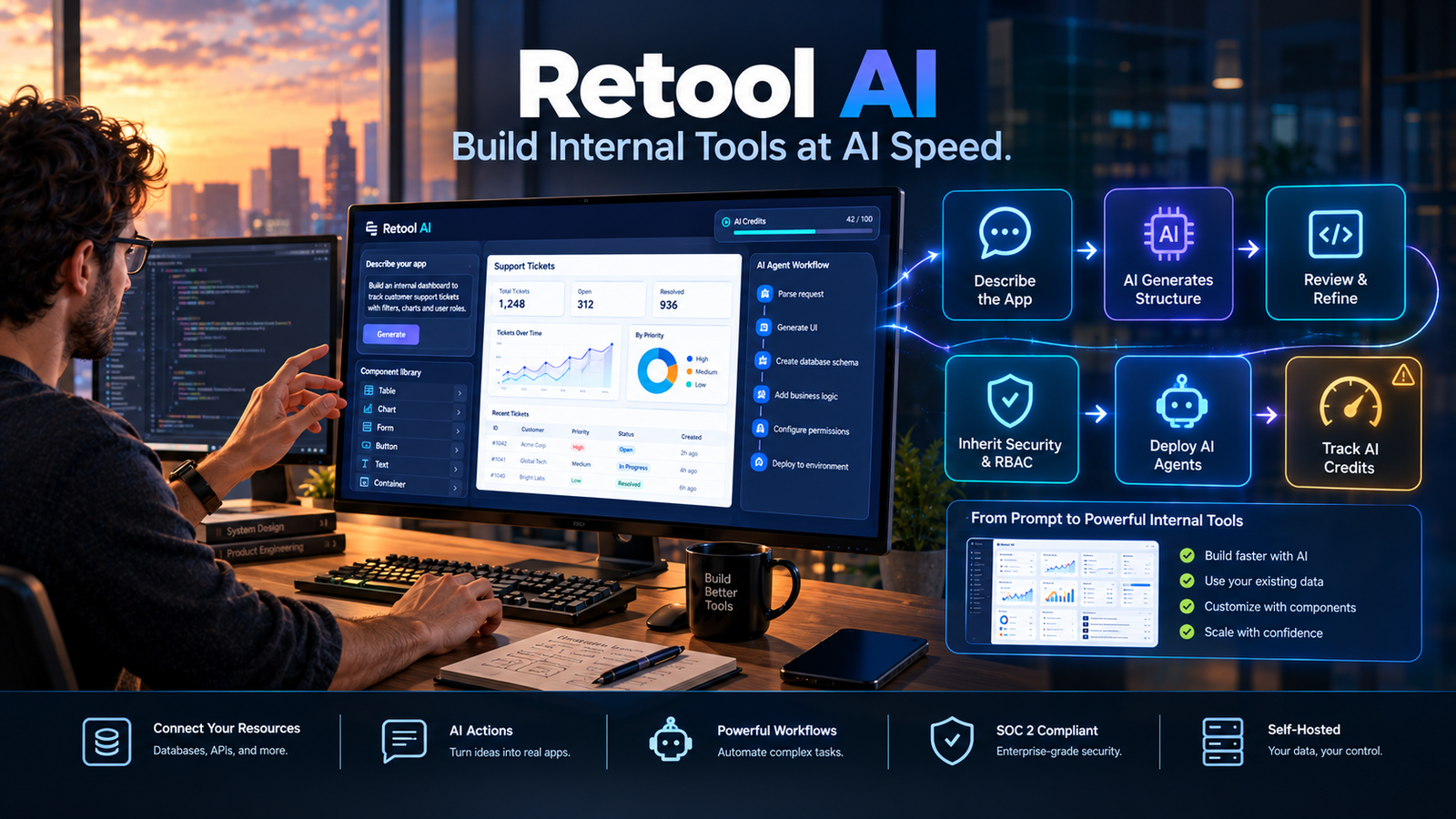
Retool AI is a set of artificial intelligence capabilities built into the Retool low-code platform, including an AI app builder, autonomous agents, AI Actions for queries, and an AI Assistant for development. It targets engineering and operations teams that need to build internal tools faster while retaining enterprise security controls.
At a Glance
- Core capability: AI-powered app generation from natural language prompts, plus agents and AI queries embedded in internal tools
- Primary users: Developers and technical operators building admin panels, dashboards, and workflow tools
- Pricing model: AI credits bundled with platform plans, starting at 250 credits per month on Free and scaling to 10,000 on Enterprise
- Key distinction: Retool AI builds internal tools, not customer-facing SaaS products
- Security posture: SOC 2 Type II and ISO 27001 certified, with Zero Data Retention reported for AI processing
- Main limitation: AI credit consumption is opaque, and the platform remains developer-oriented despite no-code ambitions
What Is Retool AI?
Retool AI is not a standalone product. It is an umbrella term for the AI features woven into Retool, a low-code platform for building internal tools.
The company launched its React-based AI app builder in June 2026, and it became the default building experience by October 2026 . Instead of dragging components onto a canvas, users describe what they want. The AI generates a working application that inherits the organization’s security policies, SSO, and role-based access controls .
Retool also offers AI Actions, which let you run model queries directly from within apps, and Retool Agents, which automate multi-step tasks like job prioritization or data review . These are separate capabilities bundled under the same AI umbrella.
The critical distinction: Retool AI is built for internal operations. It is not designed for building customer-facing products. That focus shapes both its strengths and its limits.
How Retool AI Works
The workflow depends on which capability you use. The app builder is the most distinctive.
Step 1: Describe the app. You write a natural language prompt explaining what the tool should do, what data it connects to, and how it should behave.
Step 2: AI generates the structure. Retool’s AI reads your workspace context, including existing data schemas and components, and produces a working application. It uses ToolScript, Retool’s serialization format, to represent components, queries, and layout in a structure that LLMs can parse .
Step 3: Review and refine. You stay in the loop. The AI explains its reasoning and surfaces decisions. You can edit the generated app using the canvas, code, or further prompts.
Step 4: Deploy with inherited security. Every generated app automatically adopts enterprise security settings, including SSO, RBAC, and data-level permissions .
Step 5: Add AI to the app itself (optional). You can embed AI queries or agent chat components so end users interact with models directly .
The context management is the technical core. Retool’s AI doesn’t just generate generic code. It reads your existing workspace, including connected resources and schemas, to produce apps that fit your environment .
Key Features
AI App Builder
This is the flagship feature. Retool’s AI builder generates full applications from prompts, using a React-based architecture. It supports source control, environment transitions, and multi-instance releases .
The builder is designed for collaboration, not one-shot generation. Retool explicitly frames it as a “collaborative builder” that keeps users involved in decisions rather than handing over a black box .
Retool Agents
Agents automate non-deterministic workflows. A documented case study describes a recruiting platform using a three-tier agent system: a parent “Super Recruiter” agent, a “Scout” agent for job discovery, and a “Prioritizer” agent for queue management .
Agents support observability, evaluations, tuning parameters, and RBAC access controls on higher-tier plans . They are designed to run inside Retool apps or as standalone workflow steps.
AI Actions
AI Actions let you run model queries within apps. You can generate text, analyze documents, classify data, or power chat interfaces. These are available as resource queries in the app editor .
The free tier includes 250 AI credits per month shared across the organization for app building and AI Actions .
Assist (Legacy, Deprecated)
Assist was Retool’s original in-IDE AI assistant for classic apps. It could generate apps, edit queries, and explain functionality. Retool has announced that Assist will be removed for all users on September 30, 2026, as the company shifts focus to the new AI app builder .
Users on classic apps should plan migration. The new app builder is where Retool focuses development .
Pricing: What Retool AI Actually Costs
Retool AI pricing is bundled into platform plans through an AI credit system. There is no separate “Retool AI” subscription.
Critical billing details:
- Credits do not roll over. Unused AI credits expire at the end of each billing cycle .
- Credit consumption varies. Complex prompts, larger outputs, and more data processing consume more credits. Simple prompts use fewer .
- Once credits run out, AI features stop working until the next cycle unless you purchase additional credit packs on eligible plans .
- Agents have separate pricing. The Team plan includes $50 of free agent usage per month, then charges hourly rates that vary by model capability .
The credit model creates budget uncertainty. A team generating many apps in a month may hit the 1,000-credit Team limit quickly. Retool does not publish a clear conversion rate between credits and specific actions, making forecasting difficult.
Privacy and Security
Retool’s enterprise security posture is a genuine differentiator for regulated industries.
Verified certifications: Retool holds SOC 2 Type II and ISO/IEC 27001:2022 certifications, with documents available in its trust center . It is GDPR and CCPA compliant, using Standard Contractual Clauses for EU/UK data transfers .
Zero Data Retention: Third-party analysis reports that Retool operates a Zero Data Retention privacy mode for AI processing, meaning user data is not stored by the model provider . This is a meaningful commitment, though it should be confirmed directly with Retool for specific configurations.
Data residency limitation: There is no EU-specific Retool Cloud endpoint. Organizations requiring EU data residency must self-host, either through Retool-managed infrastructure in their AWS VPC or fully self-managed deployment .
HIPAA: Not referenced on public pages. Teams handling protected health information must confirm a Business Associate Agreement directly with Retool .
Self-hosting: Available on all plans, including Free for up to 5 users. Enterprise is required for air-gapped deployment and unlimited users. Every self-hosted instance requires a Retool license key .
Who Should Use Retool AI?
Retool AI fits well for:
- Engineering teams building internal admin panels, dashboards, and operational tools
- Organizations that need AI-assisted development with enterprise security controls baked in
- Teams already using Retool’s classic apps that want faster iteration with AI
- Companies with existing data infrastructure that want to layer tools on top without building from scratch
Retool AI may not fit for:
- Teams building customer-facing SaaS products (Retool is internal-tools focused)
- Non-technical users expecting fully no-code app creation (Retool still requires JavaScript and SQL knowledge for complex logic)
- Budget-conscious teams that need predictable AI costs (the credit model is opaque)
- Organizations requiring EU data residency on cloud deployment
A LinkedIn analysis of the no-code landscape categorized Retool as an “internal-tools only” platform for AI agents, distinct from AI-native workflow builders like n8n or Langflow . That characterization aligns with Retool’s positioning.
Retool AI vs. Alternatives
Retool competes on security and enterprise readiness. Its SOC 2 and ISO 27001 certifications, plus self-hosting options, make it viable for regulated industries. Competitors like Sim and n8n compete on workflow flexibility and open-source access.
The choice depends on what you need. For internal tools with enterprise governance, Retool is strong. For AI-native workflows without the app-building layer, alternatives may fit better.
Common Mistakes When Evaluating Retool AI
Assuming it replaces developers. Retool AI accelerates development, but complex logic still requires JavaScript and SQL. The platform is low-code, not no-code for anything beyond simple apps.
Ignoring credit consumption. The 1,000-credit Team plan sounds generous until you realize complex app generation consumes credits quickly. Monitor usage from day one and model your expected consumption before committing.
Missing the Assist deprecation. If you are using classic apps and relying on Assist, plan migration before September 30, 2026. Assist will be removed .
Overlooking self-hosting for data residency. If you need EU data residency, cloud deployment will not work. Budget for self-hosted infrastructure and the operational overhead that comes with it.
Expecting customer-facing capabilities. Retool is designed for internal tools. Building a customer portal is possible on Business and Enterprise plans, but it is not the platform’s primary strength.
Frequently Asked Questions
Is Retool AI free?
Retool AI is bundled into platform plans, not sold separately. The Free plan includes 250 AI credits per month for up to 5 users. Paid plans start at $10 per builder per month for Team, which includes 1,000 AI credits .
What happens when AI credits run out?
AI-powered features become unavailable until the next billing cycle unless you purchase additional credit packs on eligible plans. Credits do not roll over .
Does Retool AI store my data?
Retool states that it does not store customer data from external sources. It acts as a query proxy. Third-party reports indicate Zero Data Retention for AI processing, though this should be confirmed for your specific configuration .
Can I self-host Retool AI?
Yes. Self-hosting is available on all plans, including Free for up to 5 users. Enterprise is required for air-gapped deployment and unlimited users. Every self-hosted instance needs a license key .
Is Retool AI good for non-technical users?
Partially. The AI app builder reduces friction for simple apps, but complex logic, data transformations, and permissions still require technical knowledge. Retool remains more accessible to developers and technical operators than to pure business users.
Conclusion
Retool AI extends a mature internal-tools platform with generative capabilities that genuinely accelerate development. The AI app builder produces working applications that inherit enterprise security. Agents automate multi-step workflows. AI Actions embed model queries directly into tools.
The strengths are substantial. SOC 2 and ISO 27001 certifications address procurement concerns. Zero Data Retention reports offer a privacy posture that regulated industries need. Self-hosting options provide flexibility for data residency requirements.
The limitations are equally real. The credit model creates budget uncertainty, with no clear conversion between credits and specific actions. The platform remains developer-oriented despite AI assistance. Assist is being deprecated, forcing classic app users to migrate. And Retool AI is not designed for customer-facing products.
Retool AI suits engineering and operations teams building internal tools who value enterprise governance and are willing to manage credit consumption carefully. It may not suit non-technical users expecting fully no-code creation or teams needing predictable, transparent AI costs.
Before committing, model your expected credit consumption against real workflows. Test the AI builder on your most complex internal tool use case, not just simple dashboards. Confirm your data residency requirements and whether self-hosting is necessary. Retool AI is a capable extension of a proven platform, but it rewards careful evaluation over impulse adoption.