An AI photobooth is event photography software or hardware that applies generative AI effects to guest photos and videos in real time. It can transform faces, swap backgrounds, generate trading cards, and produce animated clips, giving event operators a premium offering beyond standard photo strips.
At a Glance
- Core function: AI-powered photo and video effects applied at events, including face swap, background removal, and generative transformations
- Primary buyers: Photo booth operators, event agencies, and brand activation teams
- Key software players: AI Photo Booth Pro, Snappic, Touchpix, Pictor, and Snapmatic
- Hardware reality: AI effects typically run on existing iPads or DSLR setups, reducing the need for new equipment
- Pricing range: Software subscriptions vary widely, from free trials to premium tiers with credit-based AI processing
- Biggest operational concern: AI credit consumption, offline reliability, and guest data handling
What Is an AI Photobooth?
An AI photobooth is not a single product category. It describes a capability layer added to event photography, where software applies machine learning models to photos and videos captured at live events.
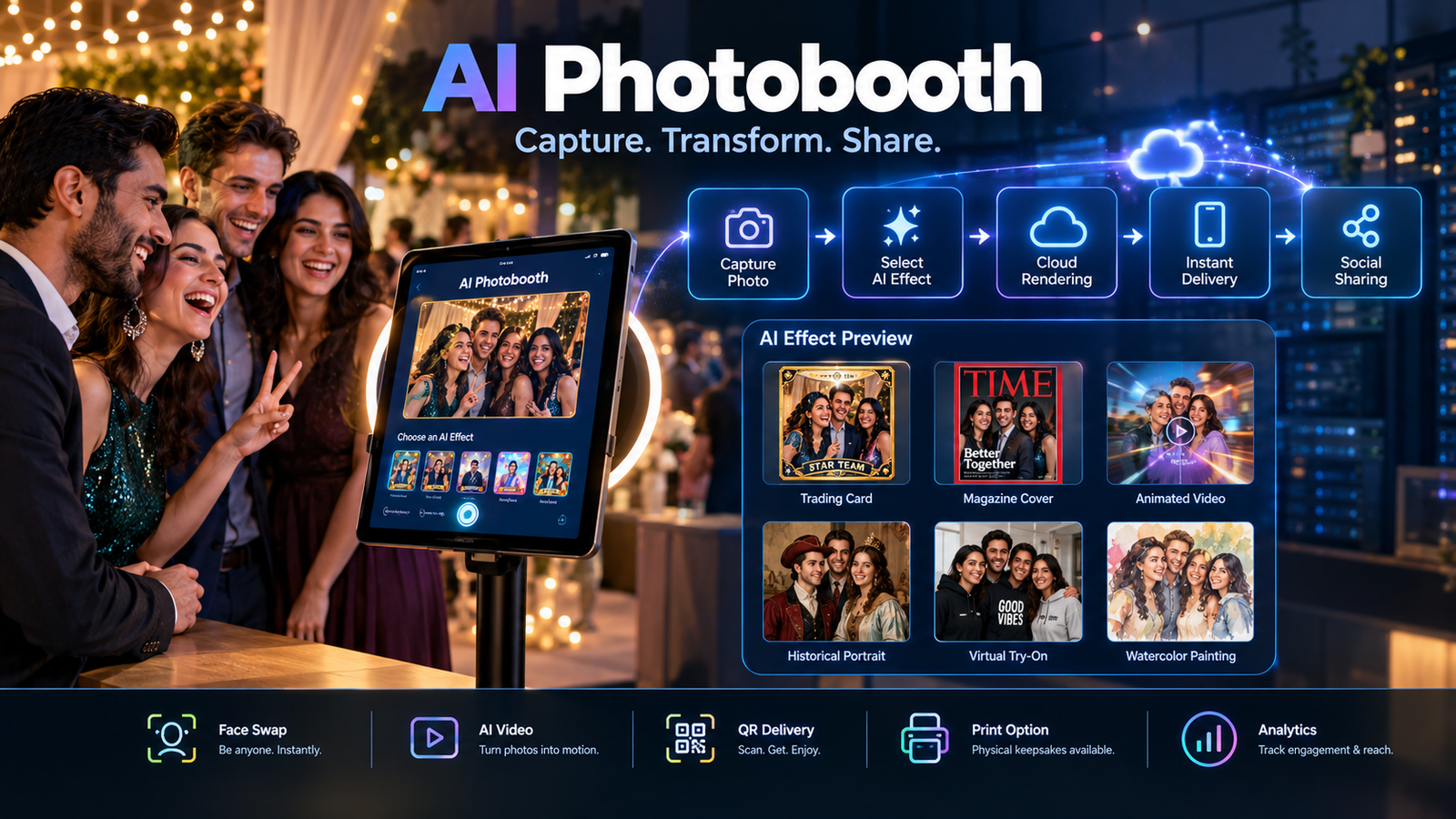
The results differ from traditional filters. Instead of overlays and color adjustments, AI photobooths use generative models to transform images. A guest can become a trading card character, a magazine cover subject, or an animated video clip .
The technology emerged from two converging trends. Photo booth software platforms were already running on iPads and DSLRs. Cloud AI processing became affordable enough to integrate into live event workflows. The result is a new product tier that operators can sell at premium rates.
Snapmatic, a London-based AI activation platform, describes the appeal plainly: AI experiences help brands “create moments people are proud to share” .
How AI Photobooths Work
The technical workflow is more accessible than the term “generative AI” suggests.
Step 1: Capture. A guest takes a photo or video using an iPad, DSLR, or 360 camera rig. The capture interface may be branded for the event.
Step 2: Select an effect. The guest chooses from pre-built AI styles: trading card, magazine cover, AI headshot, face swap, or animated video .
Step 3: Cloud processing. The image is sent to a cloud rendering service. AI Photo Booth Pro states that this requires no GPU on-site and typically renders in seconds .
Step 4: Delivery. The processed result returns to the booth for printing, or goes directly to the guest’s phone via QR code, email, or SMS.
Step 5: Sharing and analytics. Operators can track engagement, shares, and lead capture data depending on the platform.
The critical architectural detail is cloud dependency. Most AI effects require an internet connection. Touchpix markets “true offline AI” for background removal and sketch effects, but generative transformations generally need cloud processing . Operators working venues with unreliable Wi-Fi should verify offline capabilities before booking AI-heavy events.
Key Features in AI Photobooth Software
AI Effects Libraries
The core differentiator is the range and quality of AI transformations. AI Photo Booth Pro claims 50+ ready effects plus unlimited custom options, covering face swap, virtual try-on, trading cards, and product placement . Snappic offers AI-FX for photos and VideoFX for video, GIFs, and 360 captures .
Effect quality varies by provider. Operators should test outputs before committing to a platform, especially for face-heavy transformations where likeness preservation matters. Snapmatic specifically markets group-shot AI transformations as a solution to the “group photo breaks AI” problem .
Video and Animated Outputs
Static images are table stakes. The premium tier now includes AI video generation from a single photo, slow-motion 360 spins, and GlamBot robotic arm captures . Snappic extends AI effects to video and GIF outputs, which matters for social sharing .
Background Removal and Green Screen
AI background removal eliminates the need for physical green screens. This is a practical cost saver for operators and a creative enabler for branded events. Touchpix and Snappic both offer this as a standard feature .
White Labeling and Branding
Operators and agencies need to present experiences under their own brand or their client’s brand. Snappic supports branded microsites and email templates. AI Photo Booth Pro offers white labeling with custom domains .
Lead Capture and Payments
Corporate clients increasingly want measurable engagement. Snappic includes custom surveys and disclaimers for lead capture . AI Photo Booth Pro allows card and QR payments at the booth, enabling operators to monetize directly .
Pricing: What AI Photobooth Software Costs
Pricing transparency varies significantly across the market.
The credit model matters. AI Photo Booth Pro sells AI credits separately from the software subscription. Credits never expire, which is operator-friendly, but the per-render cost determines margins on AI-heavy events . Operators should calculate expected renders per event and model the credit cost against what they charge clients.
Hardware costs sit separately. A basic iPad-based booth runs a few hundred dollars. Robotic GlamBot arms and 360 platforms cost significantly more, with wholesale listings ranging from under $200 to over $8,000 depending on configuration . AI effects run on existing hardware for most software platforms, which keeps the upgrade path accessible.
Who Should Use an AI Photobooth?
AI photobooths fit well for:
- Photo booth operators who want a premium upsell for weddings and corporate events
- Event agencies running brand activations that need measurable engagement and shareable content
- Marketing teams seeking user-generated content with branded AI effects
- Operators already running iPad or DSLR booths who want to add AI without replacing hardware
AI photobooths may not fit for:
- Operators working venues with unreliable internet and no offline AI fallback
- Budget-focused events where standard photo strips suffice
- Booths handling sensitive guest populations without clear data handling policies
- Operations without the volume to justify subscription and credit costs
Snappic states it is trusted by 8,000+ operators at 100,000+ events, while AI Photo Booth Pro claims 3,000+ event pros across 80+ countries . These figures are company claims, not independently verified, but they indicate the market has moved beyond early adopters.
Privacy and Data Handling
AI photobooths capture faces and process them through cloud services. That creates data handling obligations that operators should understand before selling AI features to clients.
What platforms disclose:
- AI Photo Booth Pro’s App Store privacy label indicates data handling practices that may include tracking and data collection
- Snappic offers custom disclaimers and consent screens for lead capture and compliance
- LOOOK.AI, an AR photobooth provider, states that analytics are anonymized and GDPR-compliant, and that the system captures a single photo without recording video
What remains unclear across the category:
- Whether guest images are retained after processing or deleted
- Whether images are used for model training
- How long cloud storage persists
- Whether operators can export and delete guest data on request
No major AI photobooth software vendor publicly claims SOC 2 or Zero Data Retention. Operators handling corporate clients or events with vulnerable populations should request written data processing terms before signing contracts. GDPR compliance is a legal framework, not a technical guarantee.
Common Mistakes When Adopting AI Photobooths
Underestimating connectivity needs. Cloud AI requires stable internet. Test in the actual venue before committing to AI effects. Have a fallback mode ready if Wi-Fi fails.
Not modeling credit costs. AI renders consume credits. Calculate cost per event and price the AI tier accordingly. AI Photo Booth Pro’s non-expiring credits help, but the per-render cost still affects margins .
Skipping output testing. AI effects can fail on certain faces, lighting conditions, or group compositions. Test with diverse subjects before a live event.
Ignoring offline capabilities. If the platform does not support offline AI, the booth becomes a standard photo booth when the internet drops. Communicate this limitation to clients.
Overlooking guest consent. Face-based AI transformations involve biometric data in some jurisdictions. Consult legal guidance for events in regulated markets.
Frequently Asked Questions
What is an AI photobooth?
An AI photobooth is event photography software that applies generative AI effects to guest photos and videos. Common effects include face swap, trading cards, magazine covers, and animated video clips.
Do AI photobooths require special hardware?
Most AI photobooth software runs on existing iPads, iPhones, or DSLR setups. The AI processing happens in the cloud, so operators do not need expensive on-site GPUs.
How much does AI photobooth software cost?
Pricing varies by platform. AI Photo Booth Pro offers a free trial and subscription with separate AI credits. Snappic and Touchpix use subscription models with features bundled. Enterprise options like Snapmatic require custom quotes.
Can AI photobooths work offline?
Some features work offline, such as background removal and sketch effects in Touchpix. Most generative AI transformations require cloud processing and an internet connection.
What should operators check before buying AI photobooth software?
Verify connectivity requirements, model credit costs per render, data retention policies, and whether the platform supports offline fallback modes. Test output quality with diverse subjects before committing.
Conclusion
AI photobooths represent a practical upgrade for event photography operators. The technology adds a premium tier that clients will pay more for, and it runs on hardware most operators already own. The software market is maturing, with established players offering distinct approaches to effects, pricing, and offline support.
The limitations are operational, not conceptual. Cloud dependency creates risk at venues with weak connectivity. Credit-based AI processing adds a variable cost that must be modeled into pricing. Data handling for face-based transformations requires clearer disclosure than most vendors currently provide.
Operators should evaluate connectivity requirements, credit economics, output quality across diverse guests, and data retention terms before committing to a platform. The AI photobooth category is real and commercially viable. It is not a turnkey upgrade, and the operators who succeed will be those who test thoroughly and price correctly.