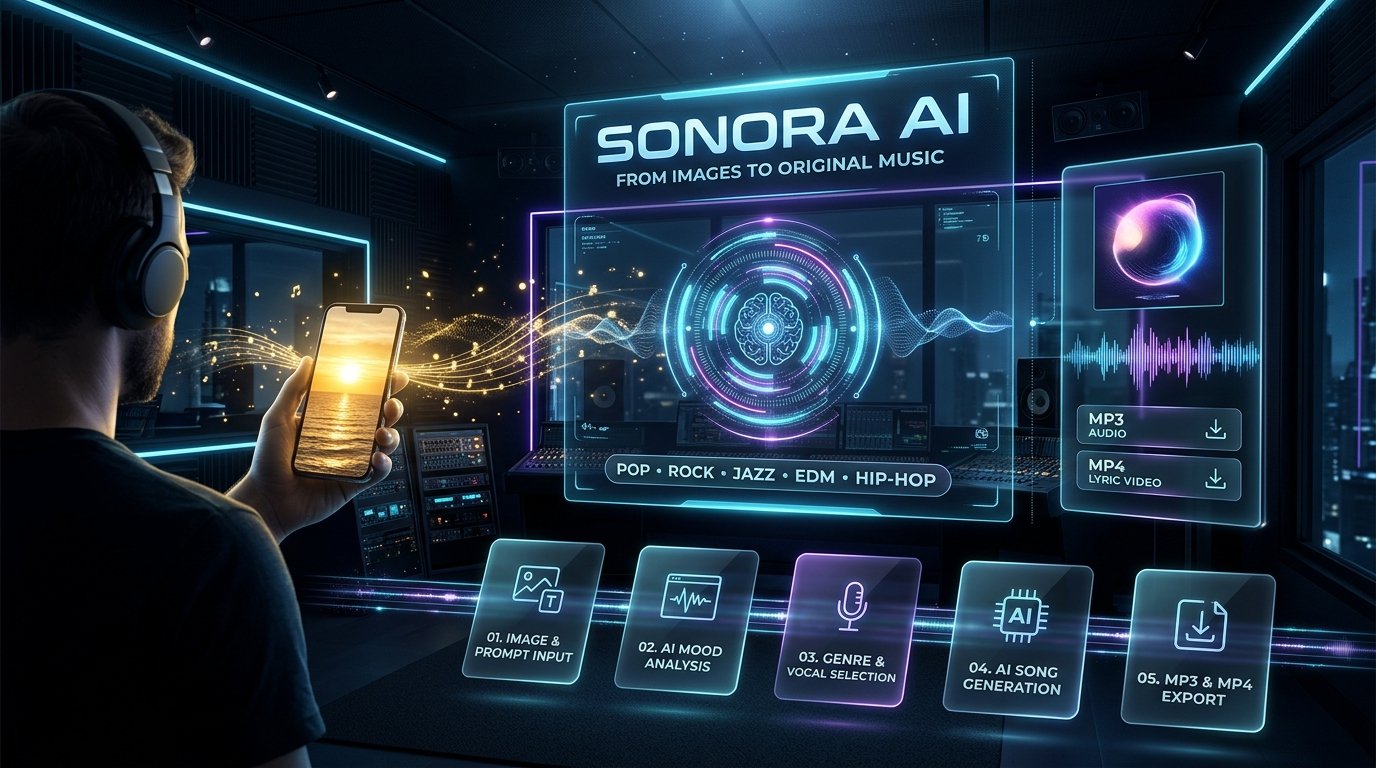
Sonora AI is a mobile AI music generator that transforms photos, written prompts, and lyrics into complete musical tracks. Its standout feature is Image-to-Song, which interprets the mood of an uploaded picture and uses it as creative inspiration for music.
Sonora AI at a Glance
- Main purpose: Generate AI-powered songs from images, text prompts, and lyrics.
- Standout feature: Image-to-Song music generation.
- Supported platforms: iOS and Android.
- Music genres: Pop, rock, jazz, electronic, hip-hop, country, classical, and EDM.
- Export formats: MP3 audio and MP4 lyric videos, according to the product website.
- Pricing model: Free download with credit-based purchases and no mandatory monthly subscription advertised.
- Best suited for: Casual creators, beginners, photographers, and social media users.
What Is Sonora AI?
Sonora AI is an artificial intelligence music creation application developed by independent developer Abdü Samed Akgül. It allows users to generate music without traditional recording equipment or professional music production knowledge.
Unlike conventional music software, Sonora AI focuses on a straightforward mobile experience. Users provide a creative idea, upload a photograph, or supply lyrics. The application then uses AI-powered music generation to produce a track based on that input.
Its most distinctive capability is Image-to-Song generation. Instead of relying exclusively on written descriptions, the application uses visual inspiration to guide music creation.
For example, a photograph of a peaceful beach might inspire relaxing instrumental music. A colorful concert photograph could produce an energetic electronic track.
Sonora AI also supports different musical genres, vocal preferences, and instrumental generation. Users can download their creations and use the available sharing options.
The application is designed for people who want to experiment with music without learning a complete digital audio workstation.
How Does Sonora AI Work?
Sonora AI simplifies music generation into three main stages. Users do not need to understand music theory or configure complicated production settings.
1. Provide an Image, Prompt, or Lyrics
Start by choosing the type of creative input you want to use.
Sonora AI supports several approaches:
- Upload an image from your device.
- Write a description of the song you want.
- Provide your own lyrics.
- Select a preset creative idea when available.
For example, you could enter a prompt describing a romantic acoustic song about a summer evening. Alternatively, upload a sunset photograph and let the Image-to-Song workflow interpret its atmosphere.
2. Choose a Musical Style
After providing your input, select a suitable musical direction.
The application advertises eight core genres:
- Pop
- Rock
- Jazz
- Electronic
- Hip-hop
- Country
- Classical
- EDM
Users can also select vocal preferences. Available options include male vocals, female vocals, and instrumental music.
These controls help guide the generated track toward the desired sound.
3. Generate and Export Your Music
Once the creative settings are ready, start the generation process.
Sonora AI processes the submitted information and creates a musical track. Depending on the selected workflow, the result can include generated lyrics and vocals.
The product website advertises two export formats:
- MP3: Downloadable audio for listening, editing, and sharing.
- MP4: Automatically generated lyric videos designed for social media content.
Completed tracks are also organized in the application’s Music Library, allowing users to revisit and export their creations.
Generation time and availability can vary depending on server conditions.
Key Features of Sonora AI
Sonora AI combines several music creation capabilities in a mobile-focused application. However, its most interesting features are those that reduce the effort required to turn an idea into a finished track.
1. Image-to-Song Generation
Image-to-Song is the application’s defining feature.
Users upload a photograph, and the AI interprets visual elements such as colors, composition, and emotional atmosphere. It then uses that interpretation to guide the musical direction.
Consider these examples:
| Uploaded Image | Possible Musical Direction |
|---|---|
| Sunset over the ocean | Relaxing, uplifting music |
| Busy concert crowd | Energetic electronic music |
| Rainy city street | Emotional, atmospheric music |
| Mountain landscape | Peaceful instrumental music |
| Romantic photograph | Soft romantic pop |
The generated result is an interpretation rather than a literal description of the photograph.
This feature is particularly interesting for photographers and visual content creators who want to give their images an original musical identity.
2. AI Lyrics Generation
Writing lyrics can be challenging, especially for people without songwriting experience.
Sonora AI provides different ways to approach lyrics. Users can supply their own words, request AI-generated lyrics, or use a creative prompt as inspiration.
This flexibility makes the application useful for brainstorming song ideas.
However, generated lyrics should always be reviewed. AI-generated writing can contain repetitive phrases, awkward expressions, or ideas that do not match the intended emotional tone.
3. Multiple Music Genres
Different creative projects require different musical styles.
Sonora AI supports eight core genres, including pop, rock, jazz, hip-hop, electronic, country, classical, and EDM.
This range allows users to experiment with different musical directions without switching between multiple applications.
The available styles are useful for personal projects, short-form videos, creative experiments, and songwriting drafts.
4. Male, Female, and Instrumental Options
Vocal selection gives users more control over their generated tracks.
The application advertises three primary options:
- Male vocals
- Female vocals
- Instrumental music
Instrumental generation is especially useful for background music, visual presentations, and videos where spoken narration needs to remain clear.
These options do not provide the same detailed vocal customization as a professional recording studio, but they offer a convenient starting point.
5. MP3 and MP4 Export
Music creation is only part of the process. Creators also need practical ways to share their results.
Sonora AI advertises MP3 downloads and automatically generated MP4 lyric videos.
MP3 files are suitable for listening and further editing. MP4 lyric videos provide a visual format that can be used in short-form content workflows.
This reduces the need to create a separate lyric video manually.
6. Credit-Based Music Generation
Another important feature is its payment structure.
Sonora AI advertises a credit-based purchasing system instead of requiring a recurring monthly subscription for its standard credit bundles.
Users can purchase credits when they need them rather than maintaining a subscription during periods of inactivity.
This model can be attractive to occasional creators. However, users should check the exact credit requirements and purchase conditions before generating multiple tracks.
Sonora AI Pricing: Is It Free?
Sonora AI is available as a free download, but that does not mean unlimited music generation is free.
Its advertised pricing approach is based on purchasing song-generation credits. New users may receive trial credits, depending on the current offer and application version.
The official product website has described small credit purchases starting around $3. However, actual prices can vary by country, storefront, and available package.
For example, the Pakistan App Store listing has displayed the following in-app purchase options:
| Purchase Option | Displayed Price |
|---|---|
| 1 Song | Rs 300 |
| 2 Songs | Rs 300 |
| 6 Songs | Rs 1,100 |
| 20 Songs | Rs 1,700 |
| 50 Songs | Rs 2,900 |
| Weekly purchase | Rs 1,300 |
These are storefront-listed prices, not guaranteed universal prices. They may change with application updates and regional pricing.
Before purchasing, consider the following:
- Check how many generations each package includes.
- Confirm whether unused credits expire.
- Review the cost of additional generations.
- Check the refund policy for unsuccessful generations.
- Verify whether any recurring purchase is selected.
Is Sonora AI worth paying for?
That depends on your music creation habits.
Someone generating a few personalized songs each month may prefer purchasing credits. A creator producing music every day should compare the total cost with subscription-based alternatives.
Always check the final purchase screen rather than relying on older pricing information.
Sonora AI Pros and Cons
Every AI music generator has strengths and limitations. Sonora AI is no exception.
Advantages
- Image-to-Song workflow: Creates music inspired by uploaded photographs.
- Beginner-friendly experience: Does not require professional music production knowledge.
- Multiple genres: Offers several popular musical styles.
- Flexible input methods: Supports images, prompts, and lyrics.
- Vocal choices: Provides male, female, and instrumental options.
- Convenient exports: Advertises MP3 audio and MP4 lyric videos.
- Credit-based purchases: Avoids requiring a standard monthly subscription for credit bundles.
- Mobile accessibility: Available through iOS and Android distribution channels.
Disadvantages
- Limited professional controls: It is not a replacement for a full digital audio workstation.
- Generation reliability: Failed generations may require contacting support about credit recovery.
- Quality variations: AI-generated vocals, lyrics, and arrangements may require several attempts.
- Limited desktop workflow: The advertised experience focuses on mobile applications.
- Unclear technical details: Public-facing materials do not fully explain the underlying music-generation architecture.
- Commercial licensing questions: Users should verify the applicable license before monetizing generated tracks.
The biggest distinction is that Sonora AI emphasizes accessibility and visual inspiration rather than comprehensive professional music production.
Sonora AI vs. Suno, Udio, and Other AI Music Generators
Sonora AI competes in a growing AI music generation market.
However, not every platform targets the same audience. Some prioritize advanced music generation, while others focus on experimentation, collaboration, or ease of use.
Here is how the main alternatives compare.
| Platform | Main Purpose | Key Strength | Pricing Model | Main Limitation |
|---|---|---|---|---|
| Sonora AI | Mobile AI music generation | Image-to-Song workflow | Credit purchases | Limited professional controls |
| Suno | Full AI song generation | Songwriting and music creation | Free and paid plans | Subscription-based paid options |
| Udio | AI music generation | Detailed musical experimentation | Free and paid options | Different workflow and access model |
| Sonauto | AI-generated music | Accessible music experimentation | Free access options | Different feature set |
Sonora AI vs. Suno
Suno is a popular AI music creation platform designed to generate complete songs from text-based creative instructions.
It is particularly useful for users who want to experiment with songwriting, vocals, and musical arrangements.
Sonora AI takes a different approach by emphasizing mobile music generation and its Image-to-Song workflow.
Choose Sonora AI if you want to turn photographs into music and prefer purchasing credits when needed.
Choose Suno if your priority is exploring a broader AI songwriting experience.
Sonora AI vs. Udio
Udio focuses on AI-generated music and offers creative tools for experimenting with musical styles and compositions.
It may be more suitable for users who want to explore music generation through a dedicated music creation workflow.
Sonora AI is more straightforward for casual mobile users who want to create songs from photographs or simple prompts.
The right option depends on your preferred workflow, output quality, and licensing requirements.
Sonora AI vs. Sonauto
Sonauto is another AI music generation alternative.
It is worth exploring if you want to experiment with AI-generated music without immediately purchasing credit packages.
Sonora AI’s main distinction is its image-first workflow and mobile application experience.
Neither platform should be selected solely on marketing claims. Test actual outputs and compare the results against your intended use.
Who Should Use Sonora AI?
Sonora AI is designed primarily for people who want accessible music creation rather than complex production controls.
Beginners
People with little or no music production experience can use prompts, lyrics, and photographs to experiment with original musical ideas.
Social Media Creators
TikTok, Instagram Reels, and YouTube Shorts creators may find the MP3 and MP4 export options useful.
They can experiment with music that matches the visual mood of their content.
However, they should verify commercial usage rights before using generated tracks in monetized content.
Photographers and Designers
Image-to-Song offers an interesting way to extend visual storytelling.
A photographer could upload a landscape photograph and generate a soundtrack that reflects its atmosphere.
Designers can also experiment with music that complements visual presentations.
Casual Music Enthusiasts
People who enjoy experimenting with creative technology may appreciate the simple interface and credit-based payment model.
They can create occasional songs without maintaining a recurring subscription.
Independent Songwriters
Songwriters can use Sonora AI for early creative exploration, lyric inspiration, and musical drafts.
However, professional musicians may need additional tools for detailed editing, mixing, mastering, and arrangement control.
Privacy, Security, and Copyright Considerations
AI music generation involves more than choosing a genre and pressing a button.
Users should understand how their creative inputs are handled and what rights they receive over generated outputs.
Privacy and Uploaded Images
Image-to-Song requires users to submit photographs for processing.
Before uploading personal or sensitive images, review the application’s privacy policy and understand how submitted files are stored, processed, and potentially shared with service providers.
The available public product information does not establish a comprehensive technical data-retention policy or a Zero Data Retention guarantee.
Therefore, avoid uploading confidential photographs or sensitive personal information unless the applicable privacy terms clearly support that use.
Copyright and Commercial Usage
AI-generated music does not automatically come with unrestricted commercial rights.
The ability to download a song does not necessarily mean you own every copyright interest in the recording, lyrics, or underlying musical elements.
Before publishing generated music commercially, review:
- The current application license agreement.
- Commercial-use permissions for your purchase tier.
- Restrictions on redistribution and monetization.
- Copyright rules in your jurisdiction.
- Music distribution platform requirements.
Also avoid uploading copyrighted lyrics, protected recordings, or another person’s photograph without appropriate permission.
For businesses and professional creators, keeping a record of the applicable license at the time of generation is a sensible precaution.
Limitations to Consider Before Choosing Sonora AI
Sonora AI offers an interesting approach to music creation, but several considerations deserve attention.
1. AI Music Quality Is Not Guaranteed
The same prompt can produce different results.
Some tracks may sound polished, while others may contain unnatural vocals, repetitive lyrics, or inconsistent musical arrangements.
Listen carefully before publishing any generated song.
2. It Is Not a Complete Music Production Studio
Sonora AI focuses on generating finished musical outputs.
Users who need detailed audio editing, advanced mixing, multitrack recording, or precise instrument control may require additional software.
3. Credits Affect Long-Term Costs
A credit-based model can be economical for occasional use.
However, repeated generation and experimentation can increase spending. Calculate the actual cost per usable song rather than comparing only the smallest package price.
4. Technical Transparency Is Limited
The product’s public-facing materials describe its capabilities but do not provide a complete technical explanation of the underlying models, training data, or generation infrastructure.
The Google Play description also references Donna AI, Udio AI, and Suno AI. However, this does not independently establish which model powers every feature or generation.
Developers and professional teams should seek further technical and licensing information before depending on the application for commercial production.
Common Mistakes to Avoid When Using Sonora AI
Getting useful results from an AI music generator requires more than uploading random content.
Avoid these common mistakes:
Using vague prompts: Describe the mood, genre, tempo, and intended atmosphere instead of writing only a few generic words.
Ignoring genre selection: Choose a musical style that complements the image or creative idea.
Accepting the first generation: Compare available variations and review lyrics before downloading the final track.
Ignoring credit consumption: Understand the cost of repeated generations before starting a large project.
Assuming commercial ownership: Review the current license instead of assuming every downloaded song is unrestricted.
Uploading sensitive images: Check the privacy terms before submitting personal or confidential material.
Frequently Asked Questions
1. What is Sonora AI used for?
Sonora AI is used to create AI-generated music from photographs, written prompts, and lyrics. It supports multiple musical genres and offers vocal and instrumental options.
2. Is Sonora AI free to use?
Sonora AI is free to download, but additional music generation generally requires purchasing credits. Available trial credits and package prices may vary by platform and region.
3. Can Sonora AI turn an image into a song?
Yes. Its Image-to-Song feature analyzes the visual mood and atmosphere of an uploaded photograph. It then uses that interpretation to guide music and lyric generation.
4. Does Sonora AI support Android and iPhone?
Yes. Sonora AI is distributed through Android and iOS application marketplaces. Check the relevant store listing for current device compatibility and availability.
5. Can I use Sonora AI music commercially?
Commercial usage depends on the applicable license and purchase conditions. Review the current terms before using generated music in advertisements, monetized videos, client projects, or commercial releases.
Final Thoughts
Sonora AI offers an interesting approach to AI-powered music creation. Its Image-to-Song feature gives users a different way to turn everyday photographs into musical ideas.
The combination of text prompts, lyric generation, multiple genres, vocal options, and mobile exports makes it accessible to beginners and casual creators.
Its credit-based purchasing model may also appeal to people who generate music occasionally rather than every day.
However, it is important to understand its limitations. It is not a complete professional music production environment, and commercial licensing, generation reliability, and output quality deserve careful evaluation.
Overall, Sonora AI is worth exploring if you want a simple mobile music generator with image-based creativity. If you need advanced production controls or detailed commercial licensing assurances, compare it with established alternatives before committing your budget.