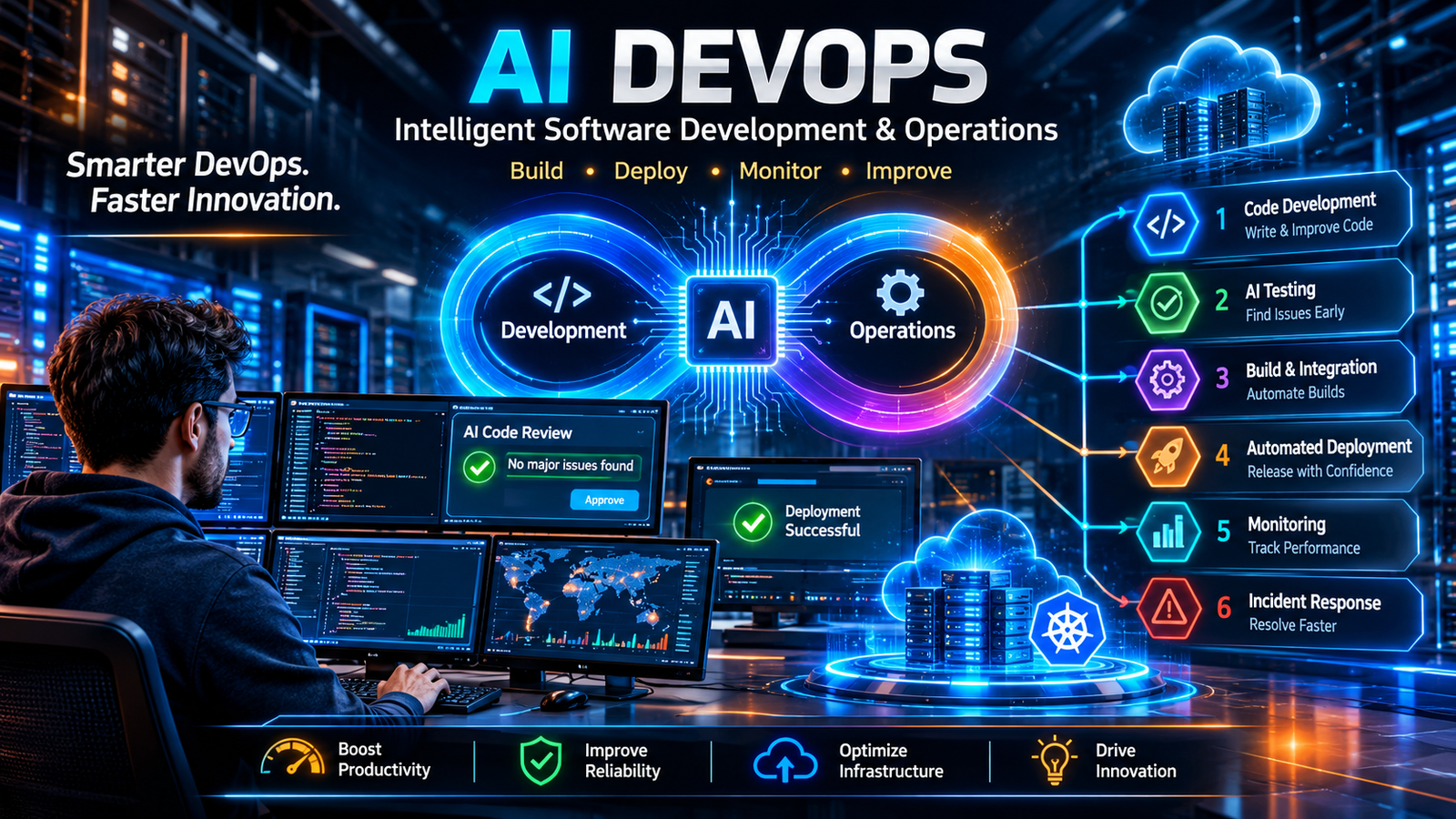
AI DevOps combines artificial intelligence with development and operations practices to improve coding, testing, deployment, and infrastructure management. It helps engineering teams automate repetitive work, identify problems faster, and make better decisions throughout the software delivery process.
AI DevOps at a Glance
- What it means: Using AI to improve software development and IT operations.
- Main purpose: Make software delivery more efficient and reliable.
- Core technologies: Machine learning, generative AI, large language models, and AI agents.
- Common applications: Code generation, automated testing, CI/CD troubleshooting, and incident investigation.
- Popular tools: GitHub Copilot, GitLab Duo, Gemini Cloud Assist, and Datadog Bits AI.
- Main concern: AI-generated changes still need proper testing, security checks, and human approval.
What Is AI DevOps?
AI DevOps is the use of artificial intelligence throughout the software development and operations lifecycle. It combines traditional DevOps automation with tools that can analyze data, generate code, identify patterns, and assist with technical decisions.
Traditional DevOps connects development and operations teams through shared workflows. Engineers use automation to build applications, run tests, deploy updates, and monitor production systems.
AI adds another layer to these processes.
For example, a traditional monitoring system might alert an engineer when server memory usage becomes unusually high. An AI-powered system can examine application logs, recent deployments, and infrastructure metrics to suggest possible causes.
This helps engineers spend less time searching for information and more time resolving actual problems.
Importantly, AI DevOps is not a single software product. It is an approach that combines existing engineering tools with AI-powered capabilities.
AI DevOps vs. Traditional DevOps
Both approaches aim to deliver reliable software. The main difference is how they use information and automation.
| Area | Traditional DevOps | AI DevOps |
|---|---|---|
| Coding | Manual development and automation | AI-assisted coding |
| Testing | Predefined test scripts | AI-assisted test generation |
| CI/CD | Rule-based pipelines | AI-assisted pipeline analysis |
| Monitoring | Threshold-based alerts | Intelligent anomaly detection |
| Troubleshooting | Manual investigation | AI-assisted diagnosis |
| Security | Traditional scanning and reviews | AI-assisted security analysis |
AI does not replace traditional DevOps tools. It makes existing workflows more intelligent when implemented correctly.
How AI DevOps Works
AI DevOps connects AI models with development environments, repositories, deployment pipelines, and monitoring systems.
The exact setup depends on the organization’s infrastructure. However, most implementations involve several common stages.
1. AI-Assisted Software Development
Developers can use AI coding assistants to generate functions, explain unfamiliar code, identify errors, and suggest improvements.
Some coding agents can also inspect repositories, modify files, execute development commands, and prepare pull requests.
For example, GitHub Copilot supports code suggestions, chat, and agent-based development workflows.
This can be useful when developers work with large codebases or need to understand unfamiliar projects. Generated code still requires review and testing before deployment.
2. Automated Testing and Code Quality
Testing helps teams catch problems before software reaches production.
AI can assist by generating test cases, explaining failed tests, identifying missing scenarios, and reviewing error messages.
Consider an application that repeatedly fails during login testing. An AI assistant can examine the relevant code and test output to suggest possible causes.
This makes investigation easier, but generated tests are not automatically correct. Developers must verify that they test the intended behavior.
3. CI/CD Pipeline Management
Continuous integration and continuous delivery (CI/CD) automate the process of building, testing, and releasing software.
AI can help engineers understand failed builds, investigate dependency conflicts, and identify slow pipeline stages.
It can also suggest improvements to deployment configurations and testing workflows.
However, AI cannot automatically fix every pipeline problem. Infrastructure limitations, inefficient scripts, and poor configurations still require engineering attention.
4. Intelligent Monitoring
Modern applications generate large amounts of operational data.
Three important sources are:
- Logs: Records of application and system events.
- Metrics: Measurements such as CPU usage, memory consumption, and response times.
- Traces: Information showing how requests move between application services.
AI can examine these sources together to identify unusual behavior.
For example, an increase in API response time might occur alongside a database configuration change. AI-assisted observability can help engineers connect these events and investigate the underlying issue.
5. Incident Detection and Troubleshooting
When a production system fails, engineers need to identify the cause and restore normal operations.
AI can support this process by grouping related alerts, summarizing logs, examining recent changes, and suggesting possible solutions.
Some advanced AI agents can also interact with operational tools.
However, actions such as restarting production services or changing infrastructure should follow strict permission and approval policies.
Main Uses of AI in DevOps
AI has practical applications across different stages of software engineering.
| Use case | How AI helps |
|---|---|
| Code development | Generates and explains code |
| Code review | Identifies potential bugs and issues |
| Software testing | Suggests test cases and analyzes failures |
| CI/CD pipelines | Investigates build and deployment problems |
| Cloud infrastructure | Helps explain configuration and resource issues |
| Monitoring | Identifies unusual system behavior |
| Incident response | Summarizes alerts and suggests root causes |
| Security | Helps analyze vulnerabilities and suspicious activity |
AI DevOps for Kubernetes
Kubernetes environments can become difficult to manage as applications grow.
Engineers may need to investigate container failures, pod restarts, resource limits, networking problems, and deployment errors.
AI assistants can explain Kubernetes events, interpret configuration files, and suggest commands for troubleshooting.
For example, when a pod repeatedly enters a crash-loop state, an assistant can help examine its logs and configuration to identify possible causes.
These recommendations should be tested before applying changes to production clusters.
AI DevOps for Cloud Infrastructure
Cloud environments often involve multiple services, databases, virtual machines, and distributed applications.
AI can help engineers understand infrastructure configurations and investigate operational problems.
Google Cloud’s Gemini Cloud Assist provides AI-assisted capabilities for cloud design, troubleshooting, and optimization. Some advanced features remain in preview, so availability and pricing should be checked before adoption.
Best AI DevOps Tools in 2026
Different platforms solve different engineering problems. Some focus on coding, while others concentrate on infrastructure management and observability.
The following tools are worth evaluating.
1. GitHub Copilot
Best suited for: Developers and software engineering teams.
GitHub Copilot provides AI-assisted coding, chat, code review, and agent-based development capabilities.
Its coding assistance can help developers understand existing projects and work through repetitive programming tasks.
Pricing: GitHub currently lists Free, Pro at $10/month, Pro+ at $39/month, and Max at $100/month for individual plans.
Limitation: Agent and chat interactions consume AI Credits. Additional usage can create costs beyond the base subscription.
Official information: https://github.com/features/copilot/plans
2. GitLab Duo
Best suited for: Teams managing development, security, and operations in GitLab.
GitLab Duo brings AI assistance into GitLab’s software development environment.
Its capabilities include agentic chat, specialized agents, automated workflows, and assistance with development tasks.
Pricing: Feature availability depends on the product offering and licensing arrangements. Check the current GitLab pricing page rather than assuming every feature is included in every plan.
Limitation: Different AI features can use different model providers and have different availability and data-retention arrangements.
Official information: https://about.gitlab.com/pricing/
3. Google Cloud Gemini Cloud Assist
Best suited for: Cloud engineers and Google Cloud administrators.
Gemini Cloud Assist helps teams design, operate, troubleshoot, and optimize cloud environments.
It is particularly relevant for organizations already using Google Cloud services.
Pricing: Google currently describes Gemini Cloud Assist as a preview offering. Some features are free during preview, while certain capabilities are associated with Gemini Code Assist Enterprise.
Limitation: Feature availability and pricing can change as capabilities move beyond preview.
Official information: https://cloud.google.com/products/gemini/cloud-assist
4. Datadog Bits AI
Best suited for: SREs, platform engineers, and operations teams.
Datadog Bits AI provides AI-assisted capabilities for observability and operational investigations.
It can help teams examine telemetry, understand alerts, and investigate application problems.
Pricing: Check current product and AI Credits documentation for applicable usage charges.
Limitation: Its value depends on the observability data and integrations available within the Datadog environment.
Official information: https://docs.datadoghq.com/bits_ai/
AI DevOps Tool Comparison
| Platform | Main purpose | Target user | Main limitation |
|---|---|---|---|
| GitHub Copilot | Coding and development assistance | Developers | AI usage limits |
| GitLab Duo | Integrated DevSecOps assistance | Engineering teams | Feature and model availability |
| Gemini Cloud Assist | Cloud operations | Cloud engineers | Google Cloud dependency |
| Datadog Bits AI | Monitoring and investigations | SRE and operations teams | Platform integration and usage costs |
The right choice depends on your existing technology stack. A coding assistant and an observability platform solve different problems, so comparing them only by price would be misleading.
Benefits of AI DevOps
AI can improve engineering workflows when teams apply it to clearly defined problems.
Faster Troubleshooting
Engineers often spend significant time searching logs, reviewing deployment history, and investigating alerts.
AI can summarize relevant information and suggest possible causes, helping teams investigate problems more efficiently.
Improved Developer Productivity
AI coding assistants can reduce repetitive programming work and help developers understand unfamiliar code.
This allows engineers to spend more time on architecture, complex debugging, and software quality.
Better Testing Workflows
AI can help generate additional test scenarios and explain failed test results.
This supports existing testing processes, although human verification remains necessary.
More Efficient Operations
AI-assisted monitoring can help identify unusual system behavior and connect information from different infrastructure components.
This can make operational investigations more organized.
Better Use of Engineering Resources
Teams can use AI to reduce time spent on repetitive tasks such as documentation, code explanations, and incident summaries.
The actual productivity improvement depends on the quality of implementation and the team’s existing workflows.
Challenges and Risks of AI DevOps
AI introduces new risks alongside its benefits. Organizations should understand these issues before connecting AI agents to important systems.
Incorrect AI Recommendations
Large language models can produce convincing but incorrect answers.
An AI assistant might suggest an outdated command, misunderstand an infrastructure configuration, or generate code containing security vulnerabilities.
Important recommendations should always be validated.
Data Privacy
DevOps environments may contain source code, API credentials, customer information, and internal infrastructure details.
Before using an AI platform, review its data processing, retention, and model-training policies.
Do not assume that every provider handles customer information in the same way.
Security and Prompt Injection
AI agents may process untrusted information from repositories, issue descriptions, documentation, and external sources.
Malicious instructions hidden in this information can influence an agent’s behavior.
Organizations should restrict agent permissions, isolate execution environments, and require approval for sensitive operations.
Integration Complexity
AI tools need to work with existing repositories, CI/CD pipelines, monitoring systems, and cloud infrastructure.
Some integrations require additional configuration, API access, and administration.
Poor integration can create more work instead of reducing it.
Unpredictable Costs
AI services may charge through subscriptions, tokens, credits, or usage-based billing.
Frequent agent interactions and expensive models can increase costs.
Teams should monitor consumption and establish spending limits before introducing AI across large engineering departments.
AI DevOps Security and Privacy Considerations
Security deserves particular attention because AI tools may interact with sensitive development and production systems.
Before selecting a platform, examine the following:
- Does the provider use customer inputs for model training?
- How long are prompts and responses retained?
- Which third-party model providers process the data?
- Can administrators restrict repository access?
- Are audit logs available?
- Can AI agents operate with limited permissions?
- Does the platform support private or self-hosted deployment?
Understanding Zero Data Retention
Zero Data Retention (ZDR) means that a provider does not retain certain customer inputs and outputs under the defined processing arrangement.
However, retention policies can differ between model providers and the software platform itself.
For example, GitLab documents different retention arrangements for different model subprocessors. Its documentation also distinguishes model-provider retention from its own chat and workflow history.
Another important distinction is that SOC 2 compliance does not automatically guarantee Zero Data Retention.
Organizations should examine the actual contractual terms and technical documentation before sending confidential information to an AI service.
How to Implement AI DevOps Successfully
A successful implementation starts with a real engineering problem, not simply a new AI subscription.
Step 1: Identify a Problem
Examine your current development workflow.
Look for recurring issues such as slow code reviews, failed deployments, repeated testing problems, or excessive monitoring alerts.
Choose one area where improvement can be measured.
Step 2: Select an Appropriate Tool
Match the platform to your requirement.
For example, use coding assistance for development tasks and observability tools for incident investigations.
Avoid purchasing multiple products that offer overlapping capabilities without a clear business reason.
Step 3: Integrate With Existing Workflows
Connect the selected tool to the necessary repositories, development environments, or monitoring systems.
Start with limited permissions and expand access only after proper testing.
Step 4: Set Approval Rules
Decide which tasks AI can perform independently.
For example, an AI assistant might summarize a failed deployment without approval. Changing production infrastructure should require authorization.
Step 5: Measure Results
Track performance before and after introducing AI.
Useful metrics include:
| Metric | What it measures |
|---|---|
| Deployment frequency | How often software is released |
| Lead time for changes | Time from code commitment to production |
| Change failure rate | Deployments that cause failures |
| Failed deployment recovery time | Time required to recover from failed deployments |
| MTTR | Average time needed to resolve incidents |
| Pipeline duration | Time required to complete CI/CD workflows |
| AI cost per task | Cost of AI-assisted work |
These measurements help determine whether AI is actually improving software delivery.
The Future of AI DevOps
AI DevOps is gradually moving beyond code suggestions toward agents that can coordinate multiple engineering tasks.
One important development is agentic software engineering.
AI agents can inspect repositories, modify code, execute tools, and prepare changes for human review. This creates opportunities to automate more complex development workflows.
Cloud platforms are also introducing AI-assisted infrastructure investigations and operational recommendations.
However, adopting these capabilities does not guarantee better results.
Google’s 2025 DORA research, based on responses from nearly 5,000 technology professionals, highlights an important finding: AI amplifies an organization’s existing strengths and weaknesses.
Teams with reliable testing, clear documentation, and effective workflows are better positioned to benefit from AI.
Organizations with poor engineering practices may simply automate existing problems.
Frequently Asked Questions
1. What is AI DevOps used for?
AI DevOps is used to improve software development and IT operations through intelligent automation. Common applications include AI-assisted coding, automated testing, CI/CD troubleshooting, infrastructure optimization, security analysis, and incident investigation.
2. How is AI changing traditional DevOps?
AI is making traditional DevOps workflows more intelligent by helping teams analyze operational data, generate code, identify potential problems, and investigate failures. It complements existing automation rather than replacing essential DevOps practices.
3. Which AI tools are commonly used in DevOps?
Popular platforms include GitHub Copilot for coding assistance, GitLab Duo for integrated DevSecOps workflows, Google Cloud Gemini Cloud Assist for cloud operations, and Datadog Bits AI for observability and incident investigations.
4. Can AI replace DevOps engineers?
No. AI can automate repetitive tasks and assist with troubleshooting, but DevOps engineers remain responsible for infrastructure architecture, security decisions, deployment reliability, and production operations. Human judgment is particularly important when AI systems interact with critical infrastructure.
5. Is AI DevOps suitable for small businesses?
Yes. Small businesses can start with affordable AI coding assistants and gradually introduce intelligent testing or monitoring tools. They should evaluate usage limits, integration requirements, data privacy, and the actual productivity improvements before expanding their investment.
Conclusion
AI DevOps is changing how development and operations teams build, test, deploy, and maintain software.
Its practical value lies in reducing repetitive work, improving troubleshooting, and helping engineers make better use of operational information.
However, AI is not a replacement for reliable engineering practices. Code quality, security, testing, and human oversight remain essential.
For smaller teams, an AI coding assistant may be a sensible starting point. Larger organizations can explore integrated DevSecOps platforms and AI-powered observability.
The best approach is to choose tools that solve measurable problems, fit existing workflows, and provide clear control over costs and data.