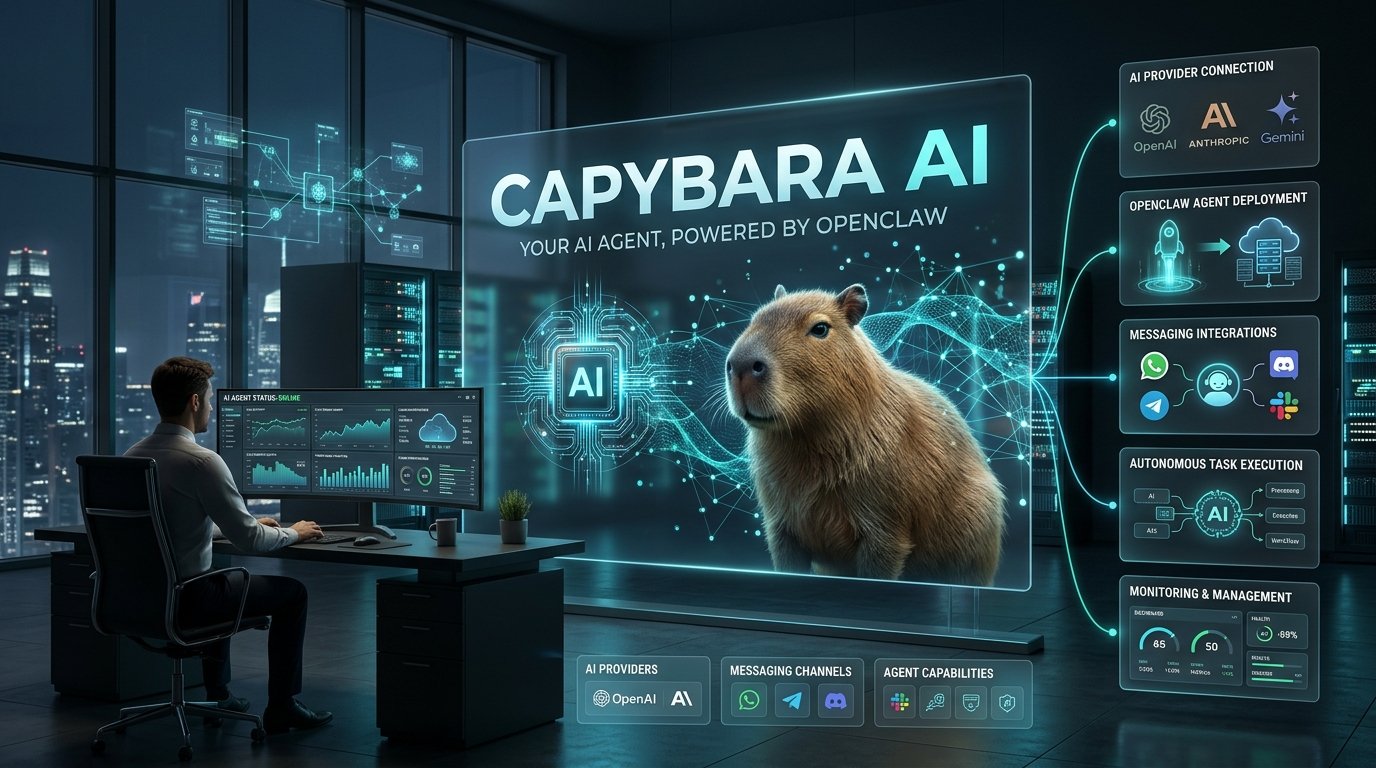
Capybara AI is a managed hosting platform that lets users deploy OpenClaw-powered AI agents without configuring their own servers or Docker environments. It supports connections to AI providers such as OpenAI, Anthropic, and Google Gemini, alongside messaging integrations and automated task execution.
Capybara AI at a Glance
- Product category: Managed AI agent hosting.
- Underlying technology: OpenClaw.
- AI providers: OpenAI, Anthropic, and Google Gemini.
- Messaging integrations: WhatsApp, Telegram, Discord, and Slack.
- Starting price: $25 monthly or $12.50 per month with annual billing.
- Best suited for: Individuals, developers, and small teams seeking hosted AI automation without managing infrastructure.
What Is Capybara AI?
Capybara AI is a cloud-based platform designed to make autonomous AI agents easier to deploy and manage. Instead of installing agent software on a personal computer or configuring a virtual private server, users can launch an OpenClaw-powered assistant through its hosted environment.
The platform focuses on removing infrastructure complexity. Users do not need to manage Docker containers, configure servers manually, or maintain their own hosting environment.
Its central idea is straightforward: provide the infrastructure for an AI agent while allowing users to choose their preferred AI provider.
This distinction matters because Capybara AI is not itself a new large language model. It provides a managed environment for running an existing AI agent framework.
Understanding the OpenClaw Connection
OpenClaw is the underlying open-source AI agent framework used by Capybara AI.
Unlike a conventional chatbot that primarily responds to questions, an AI agent can interact with external tools and perform multi-step tasks.
Depending on its configuration and permissions, an OpenClaw agent can:
- Search for information online.
- Interact with connected messaging platforms.
- Execute supported automation workflows.
- Process information from different sources.
- Use connected tools and extensions.
- Maintain useful context across interactions.
Capybara AI provides the hosting environment for these capabilities.
Consequently, users should evaluate both Capybara’s hosting service and OpenClaw’s underlying functionality before choosing the platform.
How Does Capybara AI Work?
Capybara AI simplifies the process of deploying an AI assistant into three main stages.
1. Connect an AI Provider
The first step involves connecting an AI provider.
Capybara AI identifies support for major providers, including:
- OpenAI
- Anthropic
- Google Gemini
Users supply their own provider API credentials.
This approach is commonly called Bring Your Own Key (BYOK). Instead of purchasing all AI inference through the hosting platform, users connect their existing provider accounts.
The advantage is greater flexibility over model selection and spending.
However, the API provider may charge separately for every request, depending on the selected model and usage.
2. Connect a Messaging Platform
After configuring the AI provider, users can connect supported communication channels.
The platform lists:
- Telegram
- Discord
- Slack
These integrations allow users to interact with their assistant through familiar messaging applications.
For example, someone could send a request through Telegram instead of opening a separate AI dashboard.
Businesses could also explore messaging-based workflows for internal information retrieval and routine communication.
Actual functionality depends on the integration, agent permissions, and available OpenClaw skills.
3. Deploy and Manage the Agent
Once the provider and messaging connections are configured, users can launch their AI agent.
Capybara AI provides a dashboard for managing the hosted environment.
Its advertised management features include:
- Agent status monitoring.
- Logs and activity visibility.
- Token usage monitoring.
- Connected integration management.
- Access to additional skills.
The main benefit is convenience. Users can concentrate on configuring useful workflows rather than maintaining hosting infrastructure.
Key Features of Capybara AI
Capybara AI combines managed infrastructure with the flexibility of an existing agent framework.
Here are the most important advertised features.
Managed Cloud Hosting
The platform handles the infrastructure required to run an OpenClaw instance.
This removes several responsibilities associated with self-hosting, including initial server provisioning and environment configuration.
The company also advertises automatic scaling and infrastructure maintenance.
However, users should request information about resource allocation, scaling limits, backups, and service-level guarantees before relying on it for critical business operations.
Isolated Agent Environments
Capybara AI advertises separate, private sandbox environments for individual agents.
Isolation can help separate workloads and reduce unwanted interaction between environments.
However, a private sandbox should not automatically be interpreted as comprehensive security protection.
Users should still investigate filesystem permissions, network restrictions, credential access, and isolation boundaries.
Capybara Guardrails
Another advertised feature is Capybara Guardrails, which the company says is powered by Snowball technology.
The stated purpose is to introduce additional safety controls that help keep agents within their intended boundaries.
The public product information does not provide enough technical detail to independently evaluate the guardrails’ effectiveness.
Users should ask which actions are restricted, whether approvals are supported, and how unsafe tool execution is handled.
Multiple AI Provider Options
Provider flexibility is an important part of the platform.
Users can connect supported AI services rather than being restricted to a single proprietary model.
This creates several possibilities:
- Selecting models based on reasoning requirements.
- Comparing different provider costs.
- Choosing models for different automation tasks.
- Maintaining an existing AI provider relationship.
However, the availability of a provider does not establish that every model or model feature is supported.
Messaging Integrations
Messaging integrations make an AI assistant more accessible.
Rather than switching between multiple applications, users can communicate with their agent through supported messaging services.
This is particularly useful for personal productivity, information retrieval, and routine workflows.
The precise permissions and functionality of each integration should be checked before connecting business accounts.
Built-In Web Automation
Capybara AI advertises support for OpenClaw’s browsing and task-execution capabilities.
This makes it more than a basic conversational interface.
An appropriately configured agent can potentially research information, interact with websites, and perform connected actions.
Nevertheless, autonomous browsing introduces risks. External websites can contain malicious instructions, inaccurate information, or misleading content.
Human approval should remain part of sensitive workflows.
Access to 900+ Skills
Capybara AI advertises access to more than 900 skills.
Skills extend an agent’s functionality by providing additional instructions, integrations, or task capabilities.
However, a large skills library does not guarantee that every skill is maintained, secure, or compatible with every workflow.
Review individual skill permissions and their source before installation.
What Can You Use Capybara AI For?
The platform’s practical value depends on the tasks assigned to its underlying OpenClaw agent.
Here are several relevant applications.
Personal Productivity
Individuals can explore AI-assisted workflows for everyday activities.
Potential examples include:
- Organizing information.
- Summarizing research.
- Managing routine messages.
- Preparing task lists.
- Retrieving information from connected services.
The usefulness of these workflows depends on the available tools and permissions.
Business Automation
Small businesses can investigate using an AI agent to reduce repetitive administrative work.
For example, a business could configure an assistant to collect information, prepare summaries, or organize incoming requests.
However, automated actions involving customers, payments, or confidential business records require additional controls.
Research and Information Gathering
OpenClaw’s browsing capabilities make research a relevant use case.
An agent may retrieve information from websites, summarize findings, and organize results.
For better reliability, users should require source references and independently verify important claims.
An AI-generated summary should not be treated as proof that the underlying information is accurate.
Messaging-Based Assistance
Connecting an agent to Telegram, WhatsApp, Discord, or Slack can create a convenient communication interface.
Possible applications include:
- Answering routine questions.
- Organizing team information.
- Preparing message drafts.
- Delivering automated notifications.
- Retrieving information from connected tools.
For shared workspaces, administrators should carefully restrict who can communicate with the agent.
Developer Experimentation
Developers can use managed hosting to experiment with OpenClaw without first building their own infrastructure.
This can reduce initial deployment effort.
It also provides an opportunity to explore AI provider configurations, integrations, and agent workflows.
Capybara AI Pricing: How Much Does It Cost?
Pricing is an important consideration because Capybara AI uses a BYOK model.
According to its published pricing page, the platform advertises one Starter plan with monthly and annual billing options.
| Pricing detail | Published information |
|---|---|
| Monthly billing | $25/month |
| Annual billing | $12.50/month |
| Annual payment | $150/year |
| Advertised annual saving | $150 |
| Free trial | 3 days |
| Included agents | 1 |
| Hosting | Managed cloud hosting |
| Monitoring | 24/7 uptime monitoring |
| Skills | 900+ advertised |
| AI provider keys | User supplied |
Is There a Free Plan?
The website advertises a three-day free trial.
This should not be confused with a permanently free subscription.
Users should check the checkout page for trial eligibility, payment requirements, renewal dates, and cancellation conditions.
Are AI API Costs Included?
No. The platform’s published BYOK approach requires users to supply their own AI provider credentials.
This means the hosting subscription and model inference costs should be considered separately.
For example, connecting an OpenAI API account does not mean unlimited model usage is included in the Capybara subscription.
The same principle applies to other supported providers.
What Is the Actual Monthly Cost?
The total expense depends on hosting and AI consumption.
A useful budgeting formula is:
Total monthly cost = Capybara subscription + AI provider usage + additional integration costs.
For light experimentation, model expenses may remain relatively manageable.
However, frequent research, large prompts, and multi-step automation can increase consumption.
Users should monitor API spending rather than evaluating affordability using the hosting subscription alone.
Is Capybara AI Safe and Private?
Security deserves particular attention because AI agents can access external tools and potentially sensitive information.
Capybara AI advertises isolated environments, encrypted API key storage, and additional guardrails.
The website also states that user data is not used for model training.
These are company-provided claims. They should not be confused with independently verified security certifications.
What Should Users Verify?
Before connecting personal or business accounts, investigate the following:
1. Credential protection
Understand how API keys are stored, accessed, rotated, and deleted.
2. Data retention
Check how long prompts, agent conversations, logs, and uploaded information remain available.
3. Third-party processing
An agent connected to OpenAI, Anthropic, or Google may send information to those providers.
Their individual privacy and retention policies also matter.
4. Agent permissions
Determine whether the agent can read files, execute commands, browse websites, or send messages.
5. Environment isolation
Ask whether the advertised sandbox isolates storage, processes, credentials, and network access.
6. Security certifications
Check whether the company publishes independent audit reports or certifications.
Do not assume SOC 2 compliance or Zero Data Retention simply because a provider advertises encryption or isolated hosting.
Understanding Prompt Injection Risks
Prompt injection is a significant concern for autonomous AI agents.
A malicious webpage, email, or document can contain instructions designed to manipulate an AI agent.
If the agent has permission to access files, execute commands, or send messages, a successful manipulation could have consequences beyond an incorrect answer.
OpenClaw’s security documentation discusses controls such as sandboxing, tool restrictions, access allowlists, and execution approvals.
For this reason, users should:
- Restrict access to trusted messaging accounts.
- Avoid granting unnecessary administrative permissions.
- Review third-party skills before installation.
- Require approval for sensitive actions.
- Keep important credentials outside accessible agent workspaces.
- Avoid connecting confidential accounts during initial testing.
Capybara’s hosting convenience does not eliminate the need for these precautions.
Capybara AI Advantages and Limitations
An effective evaluation should consider both the convenience and the trade-offs.
Advantages
- Simplified deployment: Users avoid manually configuring servers.
- Managed infrastructure: Hosting responsibilities are handled by the platform.
- Provider flexibility: Users can connect supported AI providers.
- Messaging access: Multiple communication integrations are advertised.
- Automation capabilities: OpenClaw provides access to agent-based workflows.
- Skill extensions: The advertised skills library expands potential functionality.
- Usage visibility: The dashboard provides token and agent monitoring features.
Limitations
- Separate AI expenses: Users pay their AI providers independently.
- Limited published technical detail: Resource specifications and infrastructure architecture are not fully documented on the public product page.
- Single advertised agent: The Starter plan lists one agent.
- Security verification: Public claims about isolation and guardrails require further technical validation.
- OpenClaw dependency: The service relies on an underlying third-party agent framework.
- Potential configuration complexity: Advanced workflows may still require technical knowledge.
- Vendor dependency: Hosting, management, and service availability depend on Capybara’s infrastructure.
Capybara AI Alternatives and Competitors
Capybara AI operates in the managed AI agent hosting category.
Its alternatives include other managed hosting providers and self-hosting options.
The most suitable choice depends on whether convenience, control, cost, or infrastructure ownership matters most.
| Platform | Target user | Key strength | Pricing transparency | Main limitation |
|---|---|---|---|---|
| Capybara AI | Individuals and small teams | Managed OpenClaw hosting | Published Starter pricing | BYOK model costs are separate |
| Hostinger OpenClaw | Beginners and website owners | Managed hosting and VPS options | Public hosting prices | Plan terms and renewals require checking |
| Agent 37 | Developers and AI enthusiasts | Multiple agent hosting options | Public plan information | Features and resource limits vary by plan |
| Self-hosted OpenClaw | Technical users | Greater infrastructure control | Infrastructure costs are separate | Requires setup and maintenance |
Capybara AI vs. Hostinger
Hostinger provides OpenClaw deployment options through its hosting infrastructure.
It is worth investigating if users already work with hosting services or want to compare managed deployment with VPS-based control.
Capybara AI focuses specifically on simplifying OpenClaw agent deployment.
The better choice depends on infrastructure preferences, included services, renewal prices, and model billing.
Capybara AI vs. Agent 37
Agent 37 is another option in the managed AI agent hosting market.
It is relevant for users comparing different agent runtimes, deployment options, and pricing structures.
Check the exact agent support, resource limits, and usage allowances before choosing between the platforms.
Capybara AI vs. Self-Hosting OpenClaw
Self-hosting is the most important alternative for technically experienced users.
You can install OpenClaw on a compatible computer or server and manage the environment yourself.
This offers more control over configuration and infrastructure.
However, it also introduces responsibilities for updates, security, backups, uptime, and maintenance.
Capybara AI may be more convenient for people who prefer paying for managed infrastructure instead of handling those responsibilities.
Who Should Use Capybara AI?
Capybara AI may be worth exploring for several user groups.
Beginners: People interested in AI agents but unfamiliar with server configuration can benefit from simplified deployment.
Freelancers: Independent professionals can experiment with messaging-based assistants and administrative automation.
Small businesses: Teams can investigate automated research, information retrieval, and routine communication workflows.
Developers: Technical users can explore OpenClaw without initially managing their own hosting environment.
AI enthusiasts: Users interested in experimenting with autonomous assistants can test agent capabilities through a managed platform.
Who Should Avoid It?
Capybara AI may not be the right choice for everyone.
It may be less suitable for:
- Users who require complete infrastructure ownership.
- Developers who prefer unrestricted server access.
- Organizations with strict data residency requirements.
- Businesses needing documented enterprise security certifications.
- Users who expect unlimited AI model usage within the hosting subscription.
- Teams requiring multiple agents beyond the advertised Starter allowance.
These users should investigate alternative hosting arrangements or request additional technical documentation.
Common Mistakes to Avoid When Using Capybara AI
Several misunderstandings can lead to disappointing results.
Assuming Hosting Includes AI Tokens
The Starter subscription covers managed hosting, but users must supply their own AI provider keys.
Budget for model consumption separately.
Giving the Agent Too Many Permissions
More permissions do not automatically produce better automation.
Start with limited access and expand permissions only when necessary.
Installing Every Available Skill
A large skills library is useful, but third-party extensions deserve scrutiny.
Review their source, permissions, dependencies, and maintenance history.
Trusting Every Automated Result
AI agents can misunderstand requests, retrieve unreliable information, or make incorrect decisions.
Use human verification for financial, legal, operational, and customer-facing tasks.
Ignoring API Usage
A busy agent may generate multiple model requests during one workflow.
Monitor token consumption and configure reasonable spending limits through your AI provider.
Frequently Asked Questions
1. What is Capybara AI used for?
Capybara AI is used to deploy and host OpenClaw-powered AI agents in the cloud. It allows users to connect AI providers, messaging applications, and supported automation capabilities without managing their own server infrastructure.
2. Is Capybara AI free to use?
Capybara AI advertises a three-day free trial rather than a permanent free subscription. Its published Starter pricing is $25 monthly or $12.50 per month with annual billing, while AI provider API usage is charged separately.
3. Does Capybara AI use OpenAI or another AI model?
Capybara AI supports user-supplied API keys from providers including OpenAI, Anthropic, and Google Gemini. It uses OpenClaw as its underlying agent framework rather than functioning as an independent foundation model.
4. Is Capybara AI safe for business use?
Capybara AI advertises isolated agent environments, encrypted API key storage, and built-in guardrails. However, businesses should independently evaluate data retention, access permissions, security documentation, and third-party processing before connecting confidential information.
5. What are the best alternatives to Capybara AI?
Alternatives include Hostinger’s OpenClaw hosting options, Agent 37, and self-hosted OpenClaw. The right option depends on infrastructure control, technical experience, hosting costs, and security requirements.
Conclusion
Capybara AI offers a straightforward approach to deploying OpenClaw-powered AI assistants without managing hosting infrastructure.
Its main strengths are managed cloud hosting, multiple AI provider connections, messaging integrations, and access to additional agent skills.
However, the platform is not an all-inclusive AI subscription. Users must account for separate model API expenses and evaluate security, resource limitations, and infrastructure details.
For beginners, freelancers, and small teams interested in experimenting with AI automation, it is worth investigating.
Developers and businesses with more demanding requirements should compare it with other managed hosting providers and self-hosted OpenClaw deployments.
Ultimately, the best decision depends on the workflows you want to automate, your expected usage, and how much control you need over your AI infrastructure.